
What is AI mobile app development?
AI mobile app development is the process of building Android and iOS applications that use machine learning and generative AI to understand language, images, speech and behaviour, and to act on them. In practice that can mean a banking app that categorizes spending automatically, a retail app that lets shoppers search with a photo, or a field-service app that summarizes a technician’s voice notes into a report.
What has changed by 2026 is where the intelligence runs and how easy it is to add. Both major mobile platforms now ship capable models on the device itself, cloud models have become far more capable and cheaper to call, and mature SDKs connect the two. That means AI-powered mobile apps are no longer limited to companies with research teams. The harder questions are now product and engineering ones: which features genuinely help users, where each model should run, what it costs to operate, and how to protect user data.
This guide walks through those questions in order, from the technology and features to the development process, costs, risks and how to choose a partner. If you are earlier in the journey, our article on how AI is actually used in mobile apps today is a useful primer.
How AI is transforming mobile applications in 2026
Interfaces are becoming conversational. Instead of navigating menus, users can ask an app to find, summarize or change something in plain language, and the app translates that request into actions.
The camera and microphone have become inputs, not just capture tools. Apps can read documents and receipts, recognize products, describe images and transcribe or translate speech, often in real time.
Personalization is moving from rules to models. Recommendations, ranking and notifications adapt to each user’s behaviour rather than to broad segments, and some of that modelling can happen on the device so personal data never leaves it.
Apps are starting to take actions, not only answer questions. With tool calling and agent-style workflows, a model can look up an order, draft a reply or fill a form inside the app, with the user confirming the final step.
Latest AI mobile app development trends
On-device generative AI is now a platform feature. Apple’s Foundation Models framework, introduced with iOS 26, gives Swift developers access to the on-device model behind Apple Intelligence, including structured output and tool calling, on devices that support Apple Intelligence. On Android, Gemini Nano runs in the AICore system service, and the ML Kit GenAI APIs expose it for tasks such as summarization, proofreading, rewriting, image description and speech recognition.
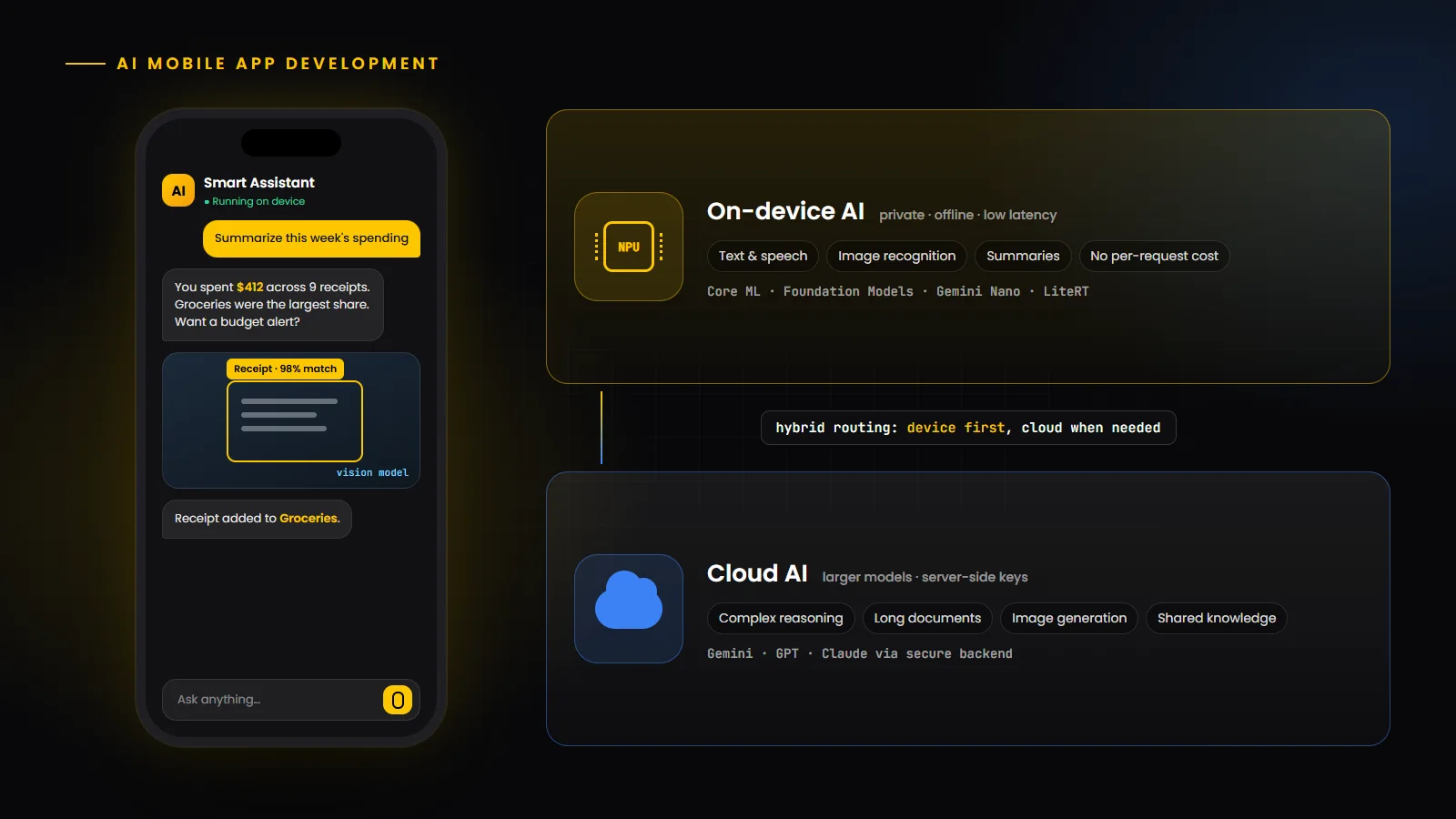
Hybrid inference is becoming the default architecture. Instead of choosing between device and cloud, apps run small, private tasks locally and route complex requests to larger cloud models. Firebase AI Logic, for example, offers hybrid inference that uses an on-device model when available and falls back to a cloud-hosted Gemini model when needed.
Agentic features are arriving in consumer apps. Both platforms now expose tool-calling patterns, so models can call functions defined by the app, which makes multi-step tasks possible without giving the model unrestricted access.
Multimodal input is standard. Text, images, audio and screen context can be combined in a single request, which enables features such as asking questions about a photo or a document.
Privacy and regulation shape design. App store privacy disclosures, regional data-protection laws and the phased obligations of the EU AI Act all push teams to process sensitive data on the device where possible and to be explicit about what is sent to the cloud.
Essential technologies for AI app development
An AI-powered mobile app usually combines platform frameworks, an on-device runtime, cloud model access and a backend. The table below shows the main building blocks and what each is typically used for.
Layer | Common technologies | Typically used for |
|---|---|---|
| iOS on-device | Core ML, Apple Foundation Models framework, Vision, Speech | Running custom models on Apple devices and using the built-in on-device language model |
| Android on-device | Gemini Nano via ML Kit GenAI APIs and AICore, ML Kit | Summaries, rewriting, image description, speech and classic tasks such as text and barcode recognition |
| Cross-platform runtime | LiteRT (formerly TensorFlow Lite), ONNX Runtime, MediaPipe | Shipping your own models to Android, iOS and the web with CPU, GPU or NPU acceleration |
| Cloud models | Gemini, GPT, Claude and other hosted models | Complex reasoning, long documents, image generation and tasks beyond device limits |
| Mobile AI SDKs | Firebase AI Logic and provider SDKs | Calling cloud models from Swift, Kotlin, Flutter and Unity with hybrid on-device fallback |
| Backend and data | Node.js or Python APIs, vector databases, analytics | Protecting API keys, retrieval over your own data, logging, evaluation and cost control |
Running your own models
When a platform model is not enough, for example for a specialized image classifier, teams train or fine-tune their own model and ship it in an on-device format. Google’s LiteRT runtime supports Android, iOS, web and desktop, uses CPU, GPU and NPU acceleration, and converts models from PyTorch, TensorFlow and JAX. On Apple platforms, Core ML is the native route. Both require attention to model size, quantization and battery impact.
AI-powered features businesses can integrate
The most valuable AI features remove effort from something users already do. Common, proven categories include:
Conversational assistants and in-app search: answering questions about products, policies or account data, and finding content by meaning rather than exact keywords.
Summaries and writing help: condensing long messages, documents or meeting notes, and drafting or rewriting replies in a chosen tone.
Vision features: scanning documents and receipts, recognizing products or plants, describing images for accessibility, and quality checks in industrial apps.
Voice features: transcription, voice commands, translation and natural-sounding text to speech.
Personalization: recommendations, smarter notifications and adaptive onboarding based on behaviour.
Fraud and anomaly detection: flagging unusual transactions, logins or usage patterns for review.
Choosing which of these to build first is a product decision, not a technical one. Our guide on how to choose the right AI features for your mobile app explains how to start from the user’s problem and avoid overbuilding.
On-device AI vs cloud-based AI
Where a model runs affects privacy, speed, cost and capability. Most production apps end up hybrid, but it helps to understand the trade-offs clearly.
Aspect | On-device AI | Cloud-based AI |
|---|---|---|
| Privacy | Data can stay on the phone, which suits personal, health and financial content | Data is sent to a server, so consent, retention and provider terms matter |
| Connectivity | Works offline | Needs a network connection |
| Latency | No network round trip, but speed depends on the device hardware | Network latency, offset by powerful server hardware |
| Capability | Smaller models with token limits; best for focused tasks | Larger models for complex reasoning, long context and generation |
| Cost model | No per-request inference fee; cost is mainly engineering | Usage-based fees that grow with your user base |
| Device coverage | Only on supported devices, so you need a fallback | Works on any device that can reach your backend |
AI mobile app development process
1. Discovery and use-case selection: define the user problem, success metrics and the data the feature needs. Rule out use cases where AI adds risk without clear value.
2. Data and model strategy: decide between platform models, hosted models and custom models, and map what data each feature may access and where it is processed.
3. Prototype and evaluate: build a quick proof of concept, then test it against a realistic evaluation set, including edge cases and harmful or off-topic inputs, before committing to a design.
4. UX design for AI: design for uncertainty, with clear loading and streaming states, editable outputs, confirmation before actions, and a graceful path when the model is unavailable.
5. Build and integrate: implement on-device and cloud paths, a backend that holds keys and enforces limits, analytics, and feature flags so behaviour can be tuned without a store release.
6. Safety, privacy and compliance review: check data flows, consent, store disclosures and abuse scenarios such as prompt injection.
7. Launch, monitor and improve: track quality, latency, cost per user and user feedback, and update prompts and models over time. AI features need ongoing tuning in a way that ordinary screens do not.
AI app development with React Native, Flutter, Swift and Kotlin
Swift and Kotlin give the most direct access to on-device AI. Platform frameworks such as Core ML, Apple’s Foundation Models framework, ML Kit and the Gemini Nano APIs are native first, so fully native apps can adopt new capabilities as soon as they ship. This matters most when on-device AI is central to the product. Our iOS app development and Android app development teams build on these native APIs.
Flutter can reach the same capabilities through plugins and platform channels, and Firebase AI Logic provides a Dart SDK for cloud models with hybrid support. React Native typically uses native modules for on-device features and calls cloud models through a backend. Cross-platform frameworks are a strong fit when most of the AI runs in the cloud and you want one codebase; plan for some native code when device-level features are essential.
Whichever stack you choose, keep cloud API keys off the device. Route calls through your own backend or a service that verifies the calling app, such as Firebase App Check, so that keys cannot be extracted from the app bundle and abused.
AI app use cases in healthcare, e-commerce, FinTech and education
Healthcare: symptom intake and triage support, medication reminders, transcription of clinician notes, and image-assisted workflows. These apps need strict privacy, clear disclaimers, human oversight and compliance with health-data regulations, so on-device processing and careful data minimization are especially valuable.
E-commerce and retail: visual search, size and style recommendations, conversational shopping assistants, review summaries and personalized offers.
FinTech: automatic expense categorization, receipt scanning, spending insights, document verification and anomaly detection. Decisions with financial impact should remain explainable and reviewable.
Education: tutoring and practice assistants, reading-level adjustment, pronunciation feedback and automatic quiz generation, with guardrails suited to younger users.
AI mobile app development costs in 2026
There is no single price for an AI app, because cost depends far more on scope than on the word “AI”. A reliable estimate starts with the specific features, the platforms, the data involved and where each model runs. The factors below are what move the budget most.
Cost factor | Lower effort | Higher effort |
|---|---|---|
| Type of AI | One feature using a platform or hosted model, such as summaries | Custom-trained models, agent workflows or multiple interacting features |
| Data | Public or user-provided input only | Retrieval over company data, labelling, pipelines and governance |
| Platforms | One platform or a cross-platform app with cloud AI | Native iOS and Android with on-device AI on each |
| Quality bar | Internal tool with human review | Customer-facing, regulated or safety-critical output |
| Integrations | Standalone feature | CRM, payments, EHR or ERP integrations and audit logging |
| Operations | Low usage or mostly on-device inference | High-volume cloud inference, monitoring and regular evaluation |
Ongoing costs to plan for
Unlike most app features, cloud AI has a running cost per request. Budget for model usage, which scales with users and prompt length; backend hosting and monitoring; periodic evaluation and prompt or model updates; and the usual maintenance as iOS and Android change. Moving suitable tasks on-device, caching results and choosing the smallest model that meets the quality bar are the most effective ways to control these costs.
The most cost-effective way to start is usually a scoped proof of concept for one high-value feature. It gives you real quality and cost data before you commit to a full build. If you would like an estimate for your idea, our mobile app development team can scope it with you.
Common challenges, security and privacy considerations
Hallucinations and wrong answers: generative models can sound confident while being wrong. Ground answers in trusted data, show sources where possible, keep humans in the loop for consequential actions, and evaluate regularly against real examples.
Prompt injection and misuse: text from users, web pages or documents can try to override your instructions. Treat model output as untrusted, limit which tools a model can call, validate every action on the server, and review the OWASP Top 10 for LLM applications.
Data privacy: collect only what each feature needs, process sensitive data on the device where possible, be transparent in App Store and Google Play privacy disclosures, and check that your model provider’s data-retention terms match your obligations.
Device fragmentation and performance: on-device models are not available on every phone, and they consume battery and memory. Detect availability at runtime and provide a fallback.
Cost and latency surprises: unmonitored cloud usage can grow quickly. Set per-user limits, cache where you can and track cost per active user from day one.
Benefits of hiring a professional AI app development company
An experienced team shortens the path from idea to a feature users trust. The main advantages are a clear use-case and data strategy before code is written, sound architecture decisions about on-device versus cloud processing, security patterns that keep keys and personal data safe, an evaluation process that catches quality problems before users do, and the mobile engineering depth to make AI features feel fast and native.
You can also combine models. Some companies keep product ownership in-house and add specialists to their own team, while others hand a full build to an agency. HBOX Digital supports both, from full builds to dedicated iOS developers and Android developers who work inside your team.
The future of AI-powered mobile applications
The direction is clear even if the pace is not. On-device models will keep improving as phone hardware adds faster neural processors, so more private and offline features will become practical. Hybrid routing between device and cloud will become a standard part of app architecture, and agent-style features that take actions inside apps will spread, with user confirmation and permission controls becoming more important.
AI will also increasingly combine with other technologies, such as augmented reality for real-world object recognition and spatial guidance. Our companion guide to AR/VR app development in 2026 covers that side of the market.
Conclusion
AI mobile app development in 2026 is less about adding a chatbot and more about making everyday tasks faster, more personal and more accessible. The strongest apps start with one clear user problem, choose the right place for each model to run, protect user data by design, and keep improving after launch.
Build Your Next AI-Powered Mobile Application With HBOX Digital
Transform your business idea into an intelligent, scalable mobile experience with our mobile app development expertise. From use-case discovery and on-device AI to secure cloud integrations, native iOS and Android, and cross-platform builds, we help you ship AI features users actually rely on.