
What is AR/VR app development?
AR/VR app development is the process of designing and building immersive applications that either add digital content to the real world (augmented reality) or place users inside a fully digital environment (virtual reality). It also covers mixed reality, where virtual objects understand and respond to the physical space around the user.
These apps run on very different hardware: everyday smartphones and tablets for most augmented reality, and headsets for virtual and mixed reality. That hardware range is the main reason AR VR app development differs from ordinary app development. Teams have to think in three dimensions, design for comfort as well as usability, budget for 3D content, and hit strict performance targets.
This guide explains the technologies, real business applications, development process, costs and trends, and separates what is in production today from what is still emerging.
Augmented reality vs virtual reality vs mixed reality
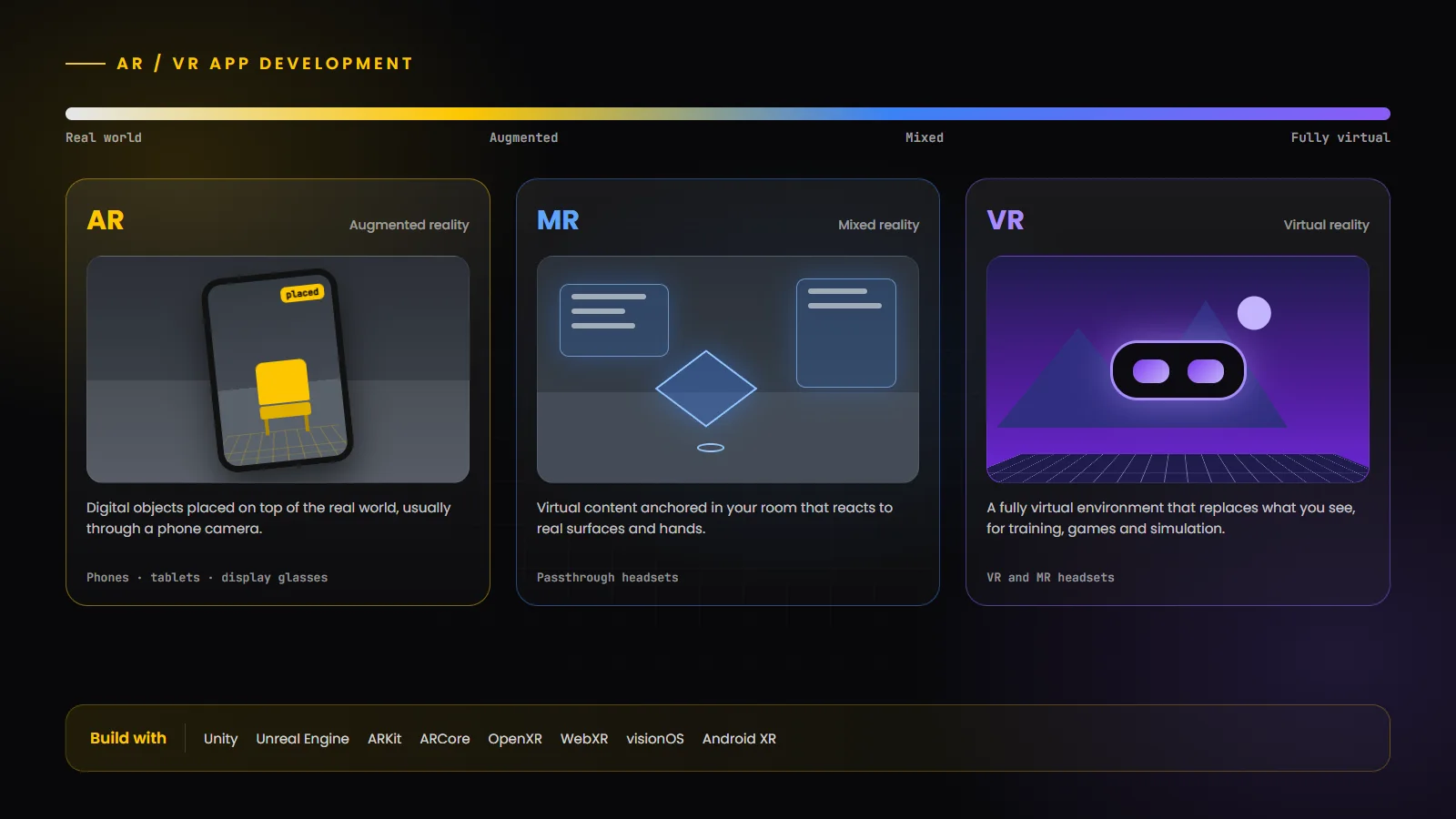
The three terms sit on a spectrum from the real world to a fully virtual one. “Spatial computing” is a broader term, popularized by Apple for Vision Pro, for applications that understand and work within 3D space.
Aspect | Augmented reality (AR) | Mixed reality (MR) | Virtual reality (VR) |
|---|---|---|---|
| What users see | The real world with digital objects overlaid | The real world with virtual objects anchored to and interacting with it | A fully virtual environment that replaces the real world |
| Typical devices | Smartphones, tablets and emerging display glasses | Headsets with colour passthrough cameras | VR and mixed reality headsets |
| Interaction | Touch, camera movement and gestures | Hands, eyes, voice and controllers | Controllers, hands and room-scale movement |
| Best for | Product visualization, try-on, navigation and marketing | Design review, guided work and spatial productivity | Training, simulation, games and virtual events |
| Reach | Broad, because it uses phones people already own | Smaller, premium and enterprise audience | Dedicated headset owners and managed enterprise fleets |
Why businesses are investing in immersive technologies
Immersive apps earn their place when seeing something in 3D, or practising it safely, is better than reading about it. Common motivations include helping customers understand products before they buy, training staff for tasks that are expensive, dangerous or hard to schedule in real life, supporting technicians with remote guidance, and reviewing designs, buildings or equipment at real scale before they exist.
The best results come from clear, narrow goals. An AR feature that lets a shopper see a sofa in their own room, or a VR module that rehearses one hazardous procedure, is easier to build, measure and scale than a broad “metaverse” initiative.
AR/VR development trends in 2026
More capable headsets: Apple refreshed Vision Pro with an M5 chip in October 2025, and Samsung launched Galaxy XR, the first headset on Google’s Android XR platform, the same month. Meta’s Quest headsets continue to run Meta Horizon OS. Mixed reality with colour passthrough is now standard on premium devices.
Open standards reduce fragmentation: OpenXR 1.1, the royalty-free Khronos standard, is supported by runtimes from Meta, Android XR, SteamVR and Pico, among others, which makes it easier to target several headsets from one codebase.
Phones remain the largest AR platform: ARKit and ARCore still put augmented reality in the hands of far more people than any headset, which keeps mobile AR the most practical starting point for consumer use cases.
AI and spatial computing are converging: scene understanding, object recognition and voice assistants are making immersive apps more context-aware. Our guide to AI mobile app development in 2026 explains the AI side of that shift.
Glasses are emerging, not mainstream: Android XR already defines categories for audio and display glasses, but app ecosystems for everyday AR glasses are still early. Treat them as an area to prototype in rather than a primary launch platform.
AR/VR technologies: Unity, Unreal Engine, ARKit, ARCore, OpenXR and WebXR
Most immersive apps are built with a real-time 3D engine plus platform SDKs. The table summarizes the main options.
Technology | What it is | Best suited for |
|---|---|---|
| Unity | Cross-platform real-time engine; AR Foundation abstracts ARKit and ARCore, with XR tooling for headsets | Cross-platform AR and VR apps, games and enterprise training |
| Unreal Engine | High-fidelity real-time engine with OpenXR support | Photorealistic visualization, architecture, automotive and high-end VR |
| ARKit and RealityKit | Apple’s AR framework and 3D rendering engine for iPhone, iPad and Vision Pro | Native iOS AR and visionOS experiences |
| ARCore | Google’s AR platform for Android, with motion tracking, environmental understanding and depth | Native Android AR and location-based AR |
| OpenXR | Royalty-free Khronos standard API for XR devices | Targeting several headsets, including Meta Quest and Android XR, from one codebase |
| WebXR | W3C browser API for VR and AR sessions; experimental with limited browser support | Lightweight, no-install experiences and campaigns |
| Android XR SDK | Jetpack XR libraries, with support for Unity, OpenXR, Unreal, Godot and WebXR | Bringing Android apps and new XR apps to Android XR devices |
Choosing a technology stack
Choose native ARKit or ARCore when you are adding AR to an existing iOS or Android app and want the best platform integration. Choose Unity when you need the same experience on several platforms or headsets, or when the product is game-like. Choose Unreal Engine when visual fidelity is the main requirement. Use WebXR for short campaigns where avoiding an app install matters more than performance, keeping in mind that MDN marks WebXR as experimental with limited browser availability.
AR/VR mobile app development
Mobile AR is the most accessible form of immersive technology because it works on phones people already carry. Common capabilities include detecting floors, walls and tables; tracking images, faces and objects; estimating lighting so virtual objects look natural; and, on devices with depth sensors, placing content behind real objects.
Good mobile AR starts with a short, focused interaction: point the camera, place or see something, and act on it. Design clear onboarding for moving the phone to scan the space, handle poor lighting gracefully, and keep 3D assets small enough to load quickly over mobile networks. When AR is a feature inside a broader product, it usually belongs in a native or cross-platform mobile app rather than a separate app. For dedicated projects, our AR development team builds both native and Unity-based experiences.
AR/VR game development
Immersive games bring their own challenges: input with hands or controllers, presence and scale, physics that feel believable, and comfort during movement. Unity and Unreal Engine are the standard engines, and most headset games are built against OpenXR or platform SDKs.
Game design has to respect the hardware. Mixed reality games can turn a living room into the play space, while VR games need comfortable movement systems such as teleportation or snap turning. If you are planning an immersive title, our game development and 3D game development teams can help, and our comparison of 2D vs 3D game development covers the art and engineering trade-offs.
Enterprise AR/VR solutions
In enterprises, immersive technology is used most for training and simulation, remote expert assistance, guided assembly and maintenance, design and engineering review, and digital twins that visualize equipment or facilities with live data.
Enterprise projects add requirements consumer apps rarely have: device management across a fleet of headsets, single sign-on, integration with existing systems such as LMS, ERP or IoT platforms, offline operation in the field, and analytics that show whether training is working. These are often the largest part of the engineering effort. Our VR development services cover training, simulation and enterprise deployments.
AR/VR applications in healthcare, education, real estate and retail
The table below separates use cases already common in production from those still emerging, so you can judge maturity before investing.
Industry | In production today | Emerging |
|---|---|---|
| Healthcare | Medical and surgical training simulations, patient education, anatomy visualization | Intra-operative guidance and remote collaboration in clinical settings, subject to regulatory approval |
| Education | Virtual labs and field trips, 3D models for science and engineering, skills practice | Shared mixed reality classrooms and AI tutors inside immersive lessons |
| Real estate | Virtual tours, 3D floor plans and AR furniture staging | Full mixed reality walkthroughs of unbuilt properties with live customization |
| Retail | AR product visualization and virtual try-on in mobile apps and on the web | In-store navigation and glasses-based shopping assistance |
AR/VR development process and architecture
1. Discovery: define the user, the goal, the target devices and how success will be measured. Decide early whether the project is mobile AR, headset VR or mixed reality, because that drives everything else.
2. Prototyping: build a quick interactive prototype on the real device. Immersive ideas often feel very different in a headset than on paper.
3. 3D content pipeline: plan how models, textures and animations are created, optimized and updated. For product catalogues, this is frequently the biggest cost.
4. Interaction and comfort design: define input methods, movement, menus and accessibility options, then test with real users.
5. Engineering: a typical architecture combines the 3D engine and platform SDK on the device, a backend for content delivery, user accounts and analytics, and integrations with business systems. Large assets are often streamed or downloaded on demand to keep the initial install small.
6. Performance optimization and QA: profile on every target device, test in different spaces and lighting, and run comfort testing.
7. Launch and operate: submit to the relevant stores or deploy through device management, then update content, fix issues and adapt to new OS releases.
Designing high-quality immersive experiences
Design for presence and clarity. Keep important content within a comfortable field of view, use real-world scale, and give clear visual and audio feedback for every interaction.
Make text legible. Text that is crisp on a phone screen can be hard to read in a headset, so use larger sizes, high contrast and panels at a comfortable distance.
Respect the user’s space. In mixed reality, anchor content to real surfaces, avoid covering the user’s path, and make it easy to reposition or dismiss virtual objects.
Keep sessions purposeful. Short, focused experiences are easier to learn, more comfortable and more likely to be completed.
AR/VR development costs in 2026
AR VR development cost varies more than almost any other kind of app, because content, platforms and interaction complexity differ so much between projects. For mobile AR specifically, our AR app development cost guide estimates a range of roughly $25,000 for a basic app to more than $500,000 for complex enterprise builds, and explains why 3D content is often the largest line item. VR and mixed reality projects follow the same logic, with the drivers below.
Cost driver | Lower effort | Higher effort |
|---|---|---|
| Platforms | One platform, such as iOS AR or a single headset | Phones plus several headsets with different input systems |
| 3D content | Existing or simple models | Large catalogues, photorealistic assets or custom animation |
| Interaction | Viewing and placing objects | Physics, hand tracking, multiplayer or complex simulation |
| Integrations | Standalone experience | LMS, ERP, IoT, analytics, single sign-on and device management |
| Fidelity and performance | Stylized visuals on capable devices | Photorealism at high frame rates on mobile-class hardware |
| After launch | Occasional updates | Frequent content updates, new devices and OS changes |
Hardware compatibility and performance
Performance is a comfort issue, not just a polish issue. Headsets refresh at high rates, typically between 72 and 120 frames per second depending on the device, and dropped frames or lag between head movement and the image can cause discomfort. Profile early on the actual target hardware, budget polygons, textures and draw calls per scene, and use level-of-detail techniques and baked lighting where possible.
Device capability varies widely. Phones differ in cameras, depth sensors and processors; headsets differ in tracking, input and passthrough quality. Define a minimum supported device list at the start, detect capabilities at runtime, and provide fallbacks, for example a 3D viewer when a phone cannot run full AR.
Security, accessibility and user comfort
Privacy and security: immersive apps can access sensitive data such as camera feeds, maps of users’ homes or workplaces, and in some cases body and hand tracking. Request only the permissions each feature needs, work within platform restrictions on sensor data, disclose collection clearly, and protect any spatial data stored on servers.
Accessibility: offer alternatives to physical actions such as standing, reaching or using both hands, provide seated modes, captions and audio cues, support adjustable text size and contrast, and avoid relying on colour alone.
Comfort: never move the camera without the user’s input, offer teleportation and snap-turn options alongside smooth movement, keep the horizon stable, avoid sudden acceleration, and encourage breaks in longer sessions.
How to choose an AR/VR development company
Look for shipped work on the platforms you care about, not only demos. Ask to see apps running on real devices, and how they performed after launch.
Check depth across the whole pipeline: interaction design, 3D art and optimization, engine development, backend and integrations. Many immersive projects struggle because one of these is missing.
Ask how they handle performance budgets, comfort testing, accessibility and device fragmentation, and how they plan for maintenance after launch.
Prefer partners who start with a paid discovery or prototype phase. It reduces risk on both sides and produces a realistic estimate.
The future of AR/VR and spatial computing
In the near term, the most reliable growth is in mobile AR inside existing apps, and in enterprise training and visualization on headsets, where the business case is easiest to measure. Premium mixed reality headsets from Apple, Samsung and Meta give developers more capable platforms, and OpenXR makes cross-device development more practical.
Further out, lighter glasses and better AI-driven scene understanding could make spatial computing part of everyday work, but timelines are uncertain and consumer adoption of headsets is still limited. The sensible strategy is to invest in use cases that pay off on today’s hardware while keeping your 3D content and code portable enough to move to new devices later.
Conclusion
AR VR app development is most successful when it solves a specific problem that benefits from seeing or practising something in 3D. Start with the platform your users already have, plan the 3D content pipeline as carefully as the code, design for comfort and accessibility from the first prototype, and choose tools such as Unity, native ARKit and ARCore, or OpenXR based on where your users are.
Bring Your AR/VR Vision to Life With HBOX Digital
Explore immersive application and game development solutions designed around your business goals. Our team plans, designs and builds AR, VR and mixed reality experiences for mobile devices and headsets, from first prototype to production release.