What is CRM development?
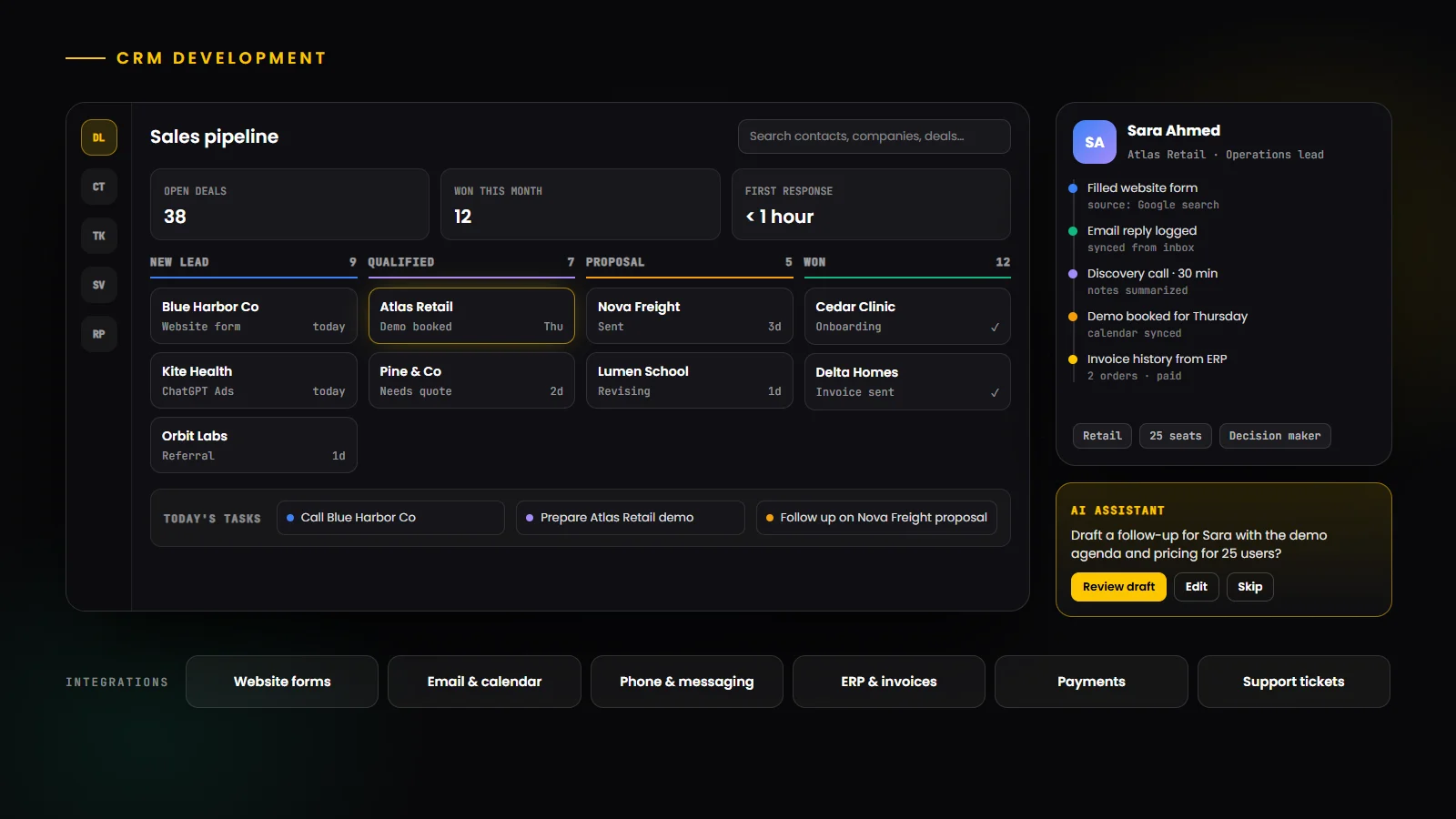
CRM development is the process of designing and building customer relationship management software: the system a business uses to manage leads, customers, deals, conversations, support requests and the reporting around them. It can mean building a fully custom CRM, extending a platform such as Salesforce, or connecting a CRM to the rest of the business with integrations and automation.
A good CRM gives every team one accurate view of each customer. Sales sees the full history before a call, support sees past orders and tickets, and management sees a pipeline it can trust. A poor fit does the opposite: teams keep side spreadsheets, data goes stale, and the CRM becomes a reporting chore rather than a working tool.
This guide covers what to build, how AI is changing CRM, how integrations and security work, and what drives cost. For a step-by-step build walkthrough, see our practical guide to CRM software development.
Why businesses invest in CRM development in 2026
CRM is one of the largest categories in business software. According to Gartner's market share research, the CRM software market grew 13.4% to about $128 billion in 2024. That spending reflects how central customer data has become to sales, service and marketing.
Three shifts are driving CRM projects now. AI agents are moving into CRM and need clean, connected customer data to work. Businesses want their CRM to fit their actual process instead of bending the process around a generic tool. And as companies grow, per-user license costs and add-ons push many to compare off-the-shelf platforms with a custom CRM they own.
Types of CRM
Most CRMs combine these three functions, with the balance depending on the business.
Type | Main focus | Typical features |
|---|---|---|
| Operational CRM | Running daily sales, marketing and service work | Pipelines, tasks, email sequences, tickets |
| Analytical CRM | Understanding customers and performance | Dashboards, forecasts, segmentation, churn signals |
| Collaborative CRM | Sharing customer context across teams and channels | Shared timelines, notes, handovers, customer portals |
| Industry CRM | Workflows specific to one sector | Property listings, patient intake, loan pipelines |
Custom CRM vs off-the-shelf CRM
Off-the-shelf platforms such as Salesforce, HubSpot and Microsoft Dynamics 365 are fast to start and come with large ecosystems. A custom CRM fits unusual workflows exactly, avoids per-user license growth and keeps full ownership of the data and roadmap, but it needs an upfront build and ongoing maintenance.
Aspect | Custom CRM | Off-the-shelf CRM |
|---|---|---|
| Fit | Built around your exact process | Configurable, but within the platform's model |
| Time to start | Weeks to months for a first release | Days to weeks |
| Cost model | Upfront build plus maintenance | Per-user subscriptions and add-ons |
| Ownership | You own the code, data model and roadmap | Vendor controls the roadmap and pricing |
| Best for | Unique workflows, many users, deep integrations | Standard sales processes, fast start |
A hybrid is often the right answer
Many companies keep a mainstream CRM and build custom modules, portals or integrations around it. Others start with a platform and move to a custom CRM once license costs and workarounds outgrow it. Our detailed comparison of custom CRM vs Salesforce breaks down the economics, and our Salesforce team works on the platform side.
Essential CRM features
Contacts and companies: a single record for every person and organization, with full activity history.
Leads and pipeline: lead capture from every channel, qualification, and deal stages that match your sales process.
Activities and tasks: calls, meetings, follow-ups and reminders, so nothing falls through the cracks.
Email and calendar sync: conversations and meetings logged automatically from the tools teams already use.
Quotes, proposals and invoices: generated from deal data, with approvals where needed.
Customer service: tickets, SLAs and a shared view of each customer's issues.
Reporting and forecasting: dashboards for pipeline, conversion, team activity and revenue forecasts.
Roles and permissions: control over who can see and edit which records and fields.
Mobile access: a responsive web app or mobile app for teams in the field.
Audit log and data export: a record of who changed what, and the ability to take your data anywhere.
AI in CRM development
AI is the biggest change in CRM since the move to the cloud. The major platforms now ship AI agents inside their CRMs: Salesforce with Agentforce, HubSpot with Breeze agents, and Microsoft with agents in Dynamics 365. Microsoft's 2026 release plans describe agentic features across sales and service, with agents working from live CRM data.
Custom CRMs can add the same capabilities, focused on the tasks that matter to your team:
Summaries: a short brief of a customer's history before every call or meeting.
Drafting: follow-up emails and proposals written from deal data, reviewed by a person before sending.
Lead scoring and prioritization: ranking leads by fit and intent signals.
Data entry and enrichment: logging calls and filling fields automatically instead of by hand.
Agents that act: an AI agent that updates records, books meetings or opens tickets through the CRM's own APIs, with permissions and approval steps.
AI is only as good as the data and permissions underneath it, so a CRM built with clean data, clear access rules and audit logs is the best foundation for AI. Our guide to AI agent development explains how agents are built safely, and our AI agent development team can add them to your CRM.
CRM integrations
A CRM's value multiplies with every system it connects to. The most common integrations are:
System | What the integration does |
|---|---|
| Website and landing pages | Sends form submissions straight into the CRM as leads, with their traffic source |
| Email and calendar | Logs emails and meetings against the right contact and deal automatically |
| Phone and messaging | Records calls and messages, including business messaging apps, on the customer timeline |
| ERP and accounting | Shares customers, orders, invoices and payment status with finance |
| Marketing automation | Syncs segments, campaigns and engagement for targeted follow-up |
| E-commerce and payments | Brings orders and purchase history into each customer record |
| Support and helpdesk | Connects tickets and service history with sales context |
Integration approach
Reliable integrations use documented APIs and webhooks, run through a queue so a slow external system never blocks the CRM, retry failures automatically and log every sync for troubleshooting. Where finance and operations matter, connecting the CRM with an ERP such as Odoo gives one consistent customer and order record across the business.
CRM architecture and tech stack
A modern custom CRM is a secure web application with a well-designed data model at its core. A typical stack looks like this:
Layer | Common choices | Role |
|---|---|---|
| Front end | React or Next.js with TypeScript | Fast, responsive screens for pipelines, records and dashboards |
| Back end | Node.js, Python or .NET APIs | Business rules, permissions, automation and integrations |
| Database | PostgreSQL | Reliable relational data for contacts, companies, deals and activities |
| Search and cache | Full-text search and Redis or Valkey | Instant search and fast dashboards |
| Background jobs | Queues and scheduled workers | Email sync, imports, reminders and integration retries |
| Hosting | AWS, Google Cloud or Azure managed services | Scalable, backed-up and monitored infrastructure |
Security, privacy and compliance
A CRM holds some of the most sensitive data a business has, so security is a core requirement rather than a feature.
Access control: role-based permissions down to the record and field level, single sign-on and multi-factor authentication.
Encryption: data encrypted in transit and at rest, with secrets kept out of the code.
Audit trails: a full record of who viewed, changed or exported data.
Backups and recovery: automated backups with tested restores.
Privacy compliance: consent tracking, data retention rules and tools to export or delete a person's data on request, in line with regulations such as GDPR and CCPA. Regulated sectors such as healthcare and finance add their own requirements.
Data migration
Most CRM projects start with data in spreadsheets, inboxes or an older CRM. A good migration audits the existing data, removes duplicates, maps old fields to the new model, runs test migrations, validates the results with the team and then cuts over at a planned time. Clean data at launch is one of the strongest predictors of whether people will trust and use the new CRM.
The CRM development process
1. Discovery: map how sales, service and marketing actually work today, and where the current tools fail.
2. Data model and workflows: define records, relationships, pipeline stages, automations and permissions.
3. Design: create screens around daily tasks, so the most common actions take the fewest clicks.
4. Build in phases: start with the core pipeline and contacts, then add service, reporting, integrations and AI.
5. Migrate and test: move data, test with real users and fix friction before launch.
6. Launch and adopt: train teams, monitor usage and keep improving based on how people actually work.
CRM development cost
CRM development cost depends mainly on scope, integrations and data. The factors below move the budget most.
Cost factor | Lower cost | Higher cost |
|---|---|---|
| Scope | Contacts, pipeline and tasks | Sales, service, marketing, portals and complex automation |
| Integrations | Website forms and email | ERP, telephony, payments, e-commerce and legacy systems |
| Data migration | Clean spreadsheets | Several messy sources with years of history |
| Users and permissions | One team, simple roles | Many teams, regions and field-level rules |
| AI | Summaries and drafting on hosted models | Agents that take actions, with approvals and evaluation |
| Compliance | Standard data protection | Regulated industries with audits and data residency |
Ongoing costs and timeline
Budget for hosting, monitoring, security updates, integration maintenance and new features after launch. A phased approach usually delivers a first usable release in a few months, with further modules added over time. It also lets you compare the total cost of ownership with off-the-shelf licenses year by year, as covered in our guide to custom software vs off-the-shelf.
CRM use cases by industry
Real estate: property and buyer matching, viewing schedules and deal tracking from enquiry to closing.
Healthcare: patient intake, appointment follow-ups and referral tracking, with strict privacy controls.
Financial services: loan and account pipelines, document collection and compliance records.
Education: student enquiries, applications and enrolment journeys.
Logistics: account management, quotes, shipments and service issues in one view.
Agencies and professional services: proposals, projects, retainers and renewals.
Measuring CRM success
Adoption: the share of the team using the CRM daily, and how much work still happens in side spreadsheets.
Data quality: complete, current and duplicate-free records.
Speed to lead: how quickly new leads receive a first response.
Pipeline health: conversion between stages, sales cycle length and forecast accuracy.
Customer outcomes: retention, repeat purchases and support resolution times.
Common CRM development mistakes
Building every feature at once instead of launching the core and improving it.
Designing for managers' reports instead of salespeople's daily work, which kills adoption.
Migrating messy data without cleaning it first.
Leaving integrations for later, so teams keep copying data between tools.
Ignoring permissions and audit logs until a security review forces a redesign.
Adding AI before the data is clean and the workflows are clear.
How to choose a CRM development company
Choose a partner that starts with your process rather than a template, has built CRMs and integrations similar to yours, can explain its data model and security approach clearly, plans data migration and user adoption as part of the project, and gives you full ownership of the code and data. Ask to see how they handle permissions, integrations and post-launch support.
HBOX Digital builds custom CRMs as part of our custom software development services, on secure, scalable foundations such as our cloud application development practice.
Conclusion
CRM development in 2026 is about more than storing contacts. The best CRMs fit the way your teams really work, connect to the rest of the business, keep customer data secure and clean, and provide the foundation that AI agents need to be genuinely useful. Start with the core workflow, migrate clean data, integrate early and keep improving based on how people use it.
Build a CRM That Fits Your Business
Whether you need a custom CRM, integrations with your existing tools or AI features on top of your customer data, our CRM developers can help you plan and build it.