
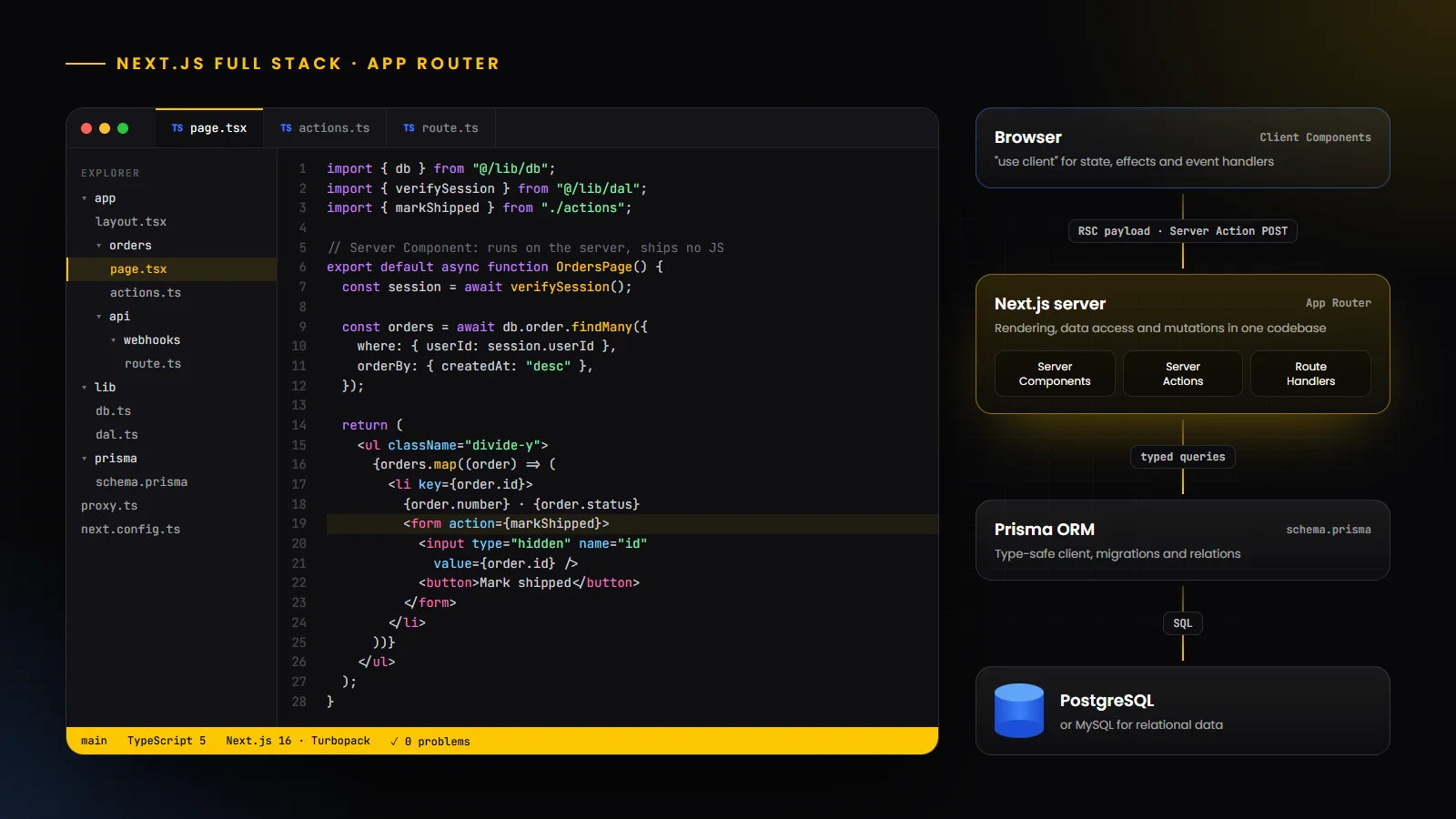
What is a Next.js full stack developer?
A Next.js full stack developer builds complete web applications with Next.js, the React framework that handles both the interface and the server. In a single TypeScript codebase they write the pages users see, the server code that reads and writes data, the endpoints other systems call, and the configuration that deploys it all.
That is different from a frontend developer who uses Next.js only as a React framework, and from a backend developer who maintains a separate API. With the App Router, much of what used to need a standalone backend, such as reading from a database, handling form submissions and receiving webhooks, can live next to the components that use it. The developer’s core job is deciding what runs on the server, what runs in the browser, and how data moves safely between the two.
This guide reflects the framework as it stands today. At the time of writing, the latest release is Next.js 16.4, published in October 2026, and the recommendations below follow the official Next.js documentation. If you are new to the broader role, start with our overview of what a full stack developer is.
Why Next.js is used for full stack development
One language and one deployment: the interface, server logic and API live in one TypeScript project, which removes much of the coordination needed to keep a separate frontend and backend in sync.
Server-first rendering: pages render on the server by default, so users receive HTML quickly and search engines can read the content. That matters for marketing sites, e-commerce and any product where discovery depends on search.
Built-in backend building blocks: Server Components can read data directly, Server Functions handle mutations, and Route Handlers expose HTTP endpoints for webhooks, mobile apps and partners.
Performance features out of the box: image optimization with next/image, font optimization with next/font, automatic code splitting by route, streaming with React Suspense, and an increasingly explicit caching model through Cache Components.
A large ecosystem and flexible hosting: Next.js is built on React, so the React ecosystem is available, and applications can run on a Node.js server, in Docker or on many hosting platforms, not only Vercel.
It is not the right tool for everything. A large backend with many independent services, heavy background processing or strict separation between teams may still be better served by a dedicated backend that Next.js calls from the server. Many production systems use both.
Next.js frontend and backend capabilities
The table below maps common full stack responsibilities to the Next.js feature that usually handles each one.
Responsibility | Next.js feature | How it is typically used |
|---|---|---|
| Pages, layouts and navigation | App Router file conventions: page, layout, loading, error | Nested layouts share UI; loading and error files add streaming states and error boundaries per route |
| Reading data for a page | Server Components | Query a database or API directly in an async component, with no client-side fetching code |
| Interactive UI | Client Components (“use client”) | State, effects, event handlers and browser APIs |
| Forms and other mutations | Server Functions used as Server Actions | Called from forms or event handlers; authentication and authorization are checked inside each one |
| HTTP endpoints for other clients | Route Handlers (route.ts) | Webhooks, mobile app APIs, partner integrations and file downloads |
| Logic before a route renders | Proxy (proxy.ts, formerly middleware) | Redirects, rewrites, headers and optimistic authentication checks |
| Caching | Cache Components (“use cache”, cacheLife) | Mark components or functions as cacheable; refresh with revalidatePath, revalidateTag or updateTag |
| Search engine visibility | Metadata API, sitemap.ts, robots.ts | Per-page titles, descriptions, canonical URLs, Open Graph images and crawl rules |
App Router and routing architecture
The App Router uses the file system for routing. Each folder inside the app directory is a route segment, and a page.tsx file makes that segment publicly accessible. A layout.tsx file wraps every page beneath it and keeps its state across navigations, which is how shared navigation bars, sidebars and providers are built.
Special files add behaviour to each segment. A loading.tsx file shows an instant loading state while data streams in, error.tsx catches errors in that part of the tree, and not-found.tsx handles missing resources. Dynamic segments such as [slug] or [id] map URL parameters to pages, and route groups, which are folders wrapped in parentheses, let you organize code or apply different layouts without changing the URL.
For a full stack developer this structure is also an architecture decision. Keeping a route’s page, components and Server Actions together makes features easy to find, while shared data access, validation and authorization logic usually live in a separate lib or server directory that every route imports.
Server Components and Client Components
In the App Router, components are Server Components by default. They render on the server, can be async, can read from databases and use secrets directly, and send no component JavaScript to the browser. That keeps bundles small and keeps data access on the server.
Client Components are opted into with the “use client” directive at the top of a file. They are rendered on the server for the first load and then hydrated in the browser, so they can use state, effects, event handlers and browser APIs. Everything a Client Component file imports also becomes part of the client bundle, which is why the directive should sit as low in the component tree as possible.
A practical rule: fetch data and assemble the page in Server Components, and push interactivity into small Client Components such as a search box, a filter menu or a chart. Props passed from a Server Component to a Client Component must be serializable, and they should contain only the fields the browser actually needs.
Use a Server Component to… | Use a Client Component to… |
|---|---|
| Fetch data from a database or internal API | Respond to clicks, typing and other user events |
| Keep API keys and other secrets on the server | Use useState, useReducer or useEffect |
| Reduce the JavaScript sent to the browser | Use browser APIs such as localStorage or geolocation |
| Render content that search engines should index | Use libraries that depend on browser-only features |
Server Functions, Server Actions and Route Handlers
Next.js uses React Server Functions for mutations. The Next.js documentation defines a Server Function as an asynchronous function that runs on the server and can be called from the client through a network request; when it is used in a form action or mutation context, it is called a Server Action. You create one with the “use server” directive, either at the top of the function body or at the top of a file to mark all of its exports.
Server Actions are usually passed to a form’s action prop or a button’s formAction prop. Forms rendered by Server Components keep working even before JavaScript has loaded, which gives you progressive enhancement for free. After a mutation, an action can call revalidatePath or revalidateTag to refresh cached data, refresh to update the current page, or redirect to send the user somewhere else.
Security is the most important detail. The documentation warns that Server Functions can be reached by direct POST requests, not only through your interface, so authentication and authorization must be verified inside every one of them. Validate input with a schema library such as Zod before touching the database, exactly as you would for a public API.
When to use Route Handlers instead
Route Handlers are route.ts files that export functions named after HTTP methods, such as GET and POST. Use them when something outside your React interface needs an endpoint: payment and CRM webhooks, a mobile app, a public or partner API, file exports or OAuth callbacks. They work with standard Request and Response objects, so any client can call them.
A simple rule of thumb: use Server Actions for mutations triggered by your own interface, Route Handlers for endpoints consumed by anything else, and Server Components, rather than internal API calls, for reading data while rendering a page.
API integration and backend development
Most production Next.js apps call other systems: payment providers, CRMs, email services, search, AI models and internal microservices. The safest pattern is to make these calls from server code, using Server Components for reads, Server Actions for writes and Route Handlers for incoming webhooks. Secrets then stay in server-side environment variables and never reach the browser, because only variables prefixed with NEXT_PUBLIC_ are exposed to client code.
Wrap each external service in a small module, for example lib/payments.ts or lib/crm.ts, with typed inputs and outputs, timeouts and consistent error handling. Importing the server-only package in those modules makes the build fail if a Client Component imports them by mistake.
For webhooks, verify the provider’s signature before trusting the payload, make the handler idempotent so that retries do not create duplicates, and respond quickly while slower work runs in a queue or background job. When a separate backend already exists, Next.js often acts as a backend-for-frontend: it calls those services from the server, combines the results and returns exactly what each page needs.
Database integration with PostgreSQL, MySQL and Prisma
Relational databases are the default for most Next.js applications: PostgreSQL for its features and ecosystem, and MySQL where it is already the company standard. Managed services such as Neon, Supabase, PlanetScale or a cloud provider’s own database remove much of the operational work.
Prisma ORM is a popular way to connect them. You describe tables and relations in a schema file, generate a type-safe client and manage changes through migrations. Prisma ORM v7 supports PostgreSQL, MySQL, MariaDB, SQL Server, SQLite, MongoDB and CockroachDB. Drizzle ORM is a common alternative for teams that prefer writing queries closer to SQL.
A few practices matter in production. Create a single shared database client so that hot reloading in development does not open a new connection on every change. Use connection pooling, especially on serverless platforms where many instances may connect at once. Apply schema changes through migrations in your deployment pipeline instead of editing production by hand. And put queries behind a data access layer that checks permissions and returns only the fields each caller needs.
Authentication and authorization
Authentication, session management and authorization are where full stack Next.js apps most often go wrong, so it is worth following the official authentication guide. Its main recommendation is to use an authentication library rather than building everything yourself. Libraries listed in the docs include Auth.js (NextAuth.js), Better Auth, Clerk, Auth0, Supabase and WorkOS, among others.
Sessions can be stateless, with session data stored in an encrypted cookie, or database-backed, where the cookie holds only an encrypted session ID. Either way, cookies should be set on the server with the HttpOnly, Secure and SameSite options.
For authorization, the guide recommends a Data Access Layer: a server-only module with a function such as verifySession() that every data request, Server Action and Route Handler calls before doing anything else. Proxy can run quick, optimistic checks such as redirecting signed-out users, but it should only read the cookie rather than query the database, and it should never be the only line of defence. Checks in layouts are not enough on their own either, because layouts do not re-render on every navigation. Finally, return data transfer objects that contain only the fields a user is allowed to see.
TypeScript integration
Next.js has built-in TypeScript support. create-next-app sets it up for you, and the framework ships types for configuration (NextConfig), metadata (Metadata) and the request and response objects used in Route Handlers and Proxy.
The real benefit comes from typing the whole data path. A Prisma or Drizzle schema produces database types, a Zod schema validates form and API input and infers its TypeScript type, and those types flow into Server and Client Components through props. When a column is renamed, the compiler points to every affected page and action instead of the bug surfacing in production.
Turn on strict mode, avoid any at the boundaries, such as webhook payloads and third-party responses, and validate external data at runtime, because TypeScript types disappear once the code is compiled.
Caching and rendering with Cache Components
Caching has historically been one of the hardest parts of the App Router. Next.js 16 introduced Cache Components, a model in which caching is opt-in and explicit: you mark a component or function with the “use cache” directive and control how long it lives with cacheLife. Anything that is not cached renders at request time, and static and dynamic parts of the same page can stream together in one response.
With Next.js 16.4, the Next.js team recommends Cache Components for every app, new projects created with create-next-app enable it by default, and it is planned to become the default in Next.js 17. Existing apps can adopt it gradually. For a full stack developer, the practical skill is deciding which data can be shared and cached, which must stay per-user and fresh, and calling revalidateTag, updateTag or revalidatePath after a mutation so that users see their changes.
SEO and performance optimization
Server rendering gives Next.js a head start for search, but good SEO still takes deliberate work. Use the Metadata API, either a static metadata export or generateMetadata for dynamic pages, to give every page a unique title, description, canonical URL and Open Graph image. Generate sitemap.xml and robots.txt from sitemap.ts and robots.ts so they stay in sync with your content, and add JSON-LD structured data only where it accurately describes what is on the page.
For performance, measure against Core Web Vitals: Largest Contentful Paint, Interaction to Next Paint and Cumulative Layout Shift. Next.js helps with next/image for responsive, lazily loaded images in modern formats, next/font for self-hosted fonts without layout shift, and automatic code splitting. Your own choices still matter most: keep Client Components small, stream slow data behind Suspense boundaries, avoid shipping heavy libraries to the browser, and use the bundle analyzer to see what is inflating your JavaScript.
Deployment and production best practices
According to the official deployment documentation, Next.js can run as a Node.js server or a Docker container, both of which support every feature, as a static export with a limited feature set, or through platform adapters. Vercel and Bun currently have verified adapters, and platforms such as Netlify, Cloudflare, AWS Amplify and Firebase App Hosting provide their own integrations. For containers, the output: “standalone” setting produces a minimal production image.
Deployment option | Feature support | Good fit for |
|---|---|---|
| Node.js server (next start) | All features | Virtual machines, PaaS providers and teams that want full control |
| Docker container | All features | Kubernetes, Google Cloud Run, AWS ECS and other container platforms |
| Static export | Limited (no server features) | Marketing sites or single-page apps served from a CDN or object storage |
| Platform adapter or integration | Varies by platform | Managed hosting; verified adapters run the official compatibility test suite |
Production checklist
Keep secrets in server-side environment variables and expose only NEXT_PUBLIC_ values that are safe for anyone to read.
Patch promptly. In 2026 Next.js moved to a formal, scheduled security release process, and serious issues such as the December 2025 React Server Components vulnerability (CVE-2025-66478) showed how important it is to upgrade quickly.
Run linting, type checks, tests and a production build in CI before every deployment.
Add error tracking, structured logs and uptime monitoring, and watch real-user Core Web Vitals after each release.
Run database migrations as part of the deployment pipeline, and keep backups and a rollback plan.
Set security headers, and keep authorization checks in the data layer rather than only in the interface.
Next.js full stack development roadmap
If you already know React, becoming a Next.js full stack developer is mostly about the server side. This is a practical order to learn it in, with a project to prove each stage.
Stage | What to learn | Milestone project |
|---|---|---|
| 1 | React and TypeScript fundamentals: components, props, state, hooks and typing props and events | A small, fully typed interactive app |
| 2 | App Router basics: pages, layouts, dynamic segments, loading and error states, and navigation | A multi-page site with nested layouts |
| 3 | Server and Client Components: server-side data fetching, the “use client” boundary, Suspense and streaming | A product catalogue that reads from an API |
| 4 | Mutations: Server Actions, forms, useActionState, Zod validation and revalidation | A task or CRM app with create, update and delete |
| 5 | Databases: PostgreSQL, Prisma or Drizzle, migrations, relations and a data access layer | Persist the app’s data with versioned migrations |
| 6 | Authentication and authorization: an auth library, sessions, Proxy and role checks in every action | Add sign-in and per-user data |
| 7 | Route Handlers and integrations: webhooks, third-party APIs and server-only modules | Connect payments or email through webhooks |
| 8 | Caching, SEO and performance: Cache Components, the Metadata API, sitemaps, next/image and Core Web Vitals | Audit and optimize the finished app |
| 9 | Deployment and operations: CI, Docker or a hosting platform, monitoring and security updates | Ship to production with CI and monitoring |
Real-world applications and use cases
SaaS products and dashboards: authenticated apps with per-user data, billing and admin areas fit naturally into Server Components and Server Actions.
E-commerce and marketplaces: server-rendered product and category pages help with search visibility, cart and checkout logic runs securely on the server, and payment webhooks arrive through Route Handlers.
Content and marketing sites: blogs, documentation and landing pages benefit from static rendering, fast loads and detailed metadata. This website, for example, runs on the Next.js App Router.
Booking and scheduling platforms: availability, reservations and notifications combine database work with calendar, payment and messaging integrations.
Internal tools and portals: admin panels, CRMs and reporting tools can be built quickly with forms backed by Server Actions and a shared data access layer.
AI-powered applications: calling model APIs from the server keeps keys private, and streaming lets responses appear as they are generated.
Hiring a Next.js full stack developer
When you evaluate candidates, ask them to explain where a piece of code runs and why: which components are Server Components, where the “use client” boundary sits, how a Server Action checks permissions, and how data is revalidated after a change. Developers who reason clearly about the server and client boundary avoid the most expensive mistakes, such as leaking private data to the browser or shipping unprotected mutations.
Experience with the database and deployment side matters as much as React skills. Look for real projects with authentication, migrations, a production deployment and some evidence of performance or SEO work.
If you need this capacity quickly, HBOX Digital provides dedicated engineers through staff augmentation, including Node.js and full stack JavaScript developers, and builds web applications and MVPs end to end. You can also browse our case studies to see how our engineers work inside client teams.
Conclusion
Next.js lets one developer, or one small team, own an application from the database to the browser. Doing that well depends less on memorizing APIs and more on judgement: what to render on the server, what to send to the client, how to protect every mutation, and how to cache without serving stale or private data.
Learn the App Router, Server and Client Components, Server Actions and Route Handlers first, then add a database, authentication, caching and a reliable deployment process. Keep an eye on the Next.js blog, because the framework moves quickly. If you are planning a Next.js product and need experienced hands, get in touch with our team.