
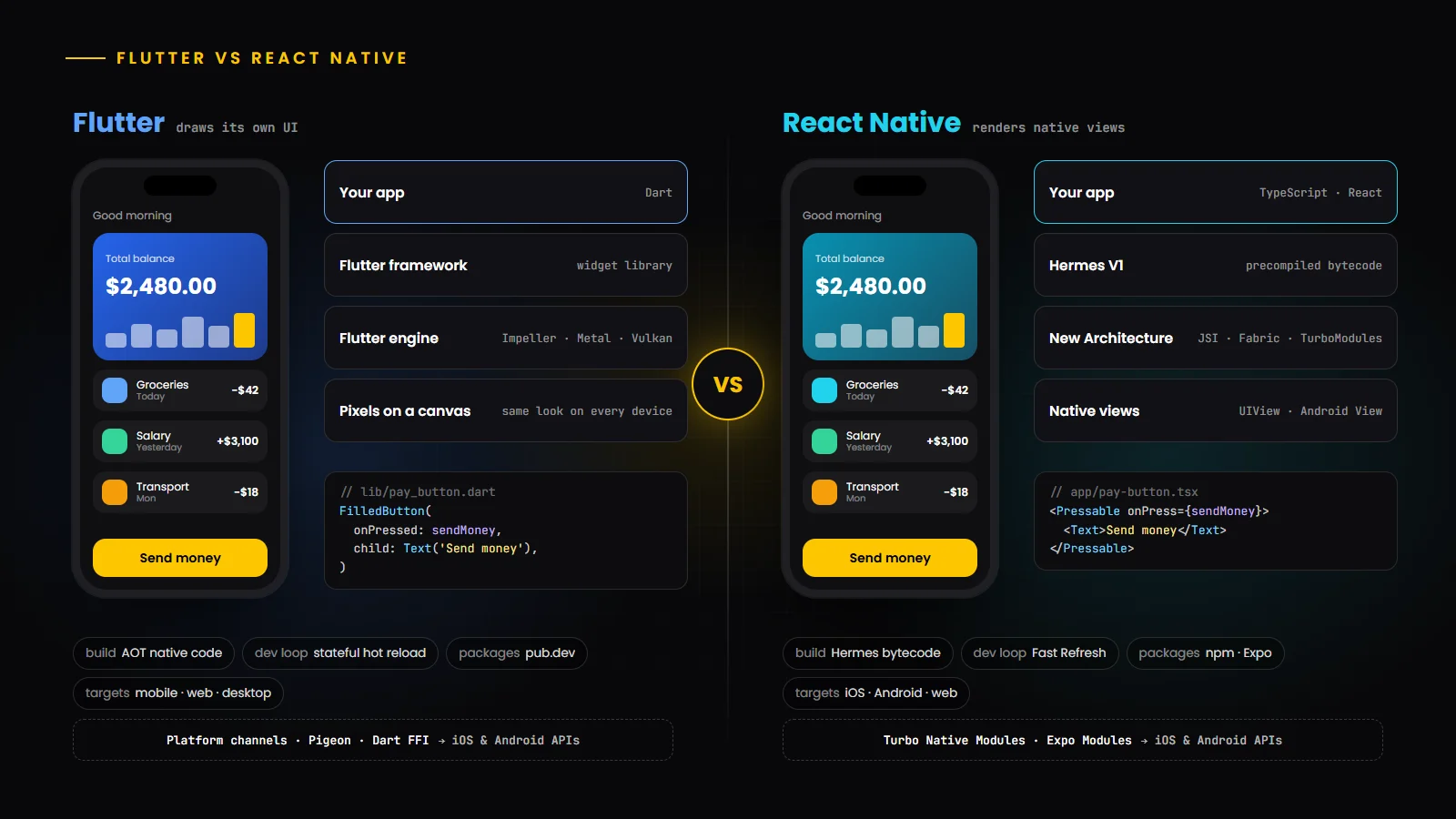
Cross-platform mobile development in 2026
Cross-platform mobile development means building Android and iOS apps from one shared codebase instead of two separate native projects. For many products it cuts duplicated work, keeps features in sync across platforms and lets one team ship to both stores. Flutter and React Native are the two frameworks most teams shortlist, and both are mature, actively developed and used in large production apps.
That maturity is exactly why the choice is harder than it used to be. Both frameworks can deliver smooth, native-feeling apps, so the decision now depends on your team’s skills, your design approach, how much native code you need and how the app fits into the rest of your technology stack. This guide compares them on the points that matter in practice, without declaring a universal winner. If you are still deciding whether to go cross-platform at all, read our comparison of cross-platform vs native app development first.
What is Flutter?
Flutter is Google’s open-source UI toolkit for building apps for mobile, web and desktop from a single Dart codebase. Instead of wrapping the platform’s own UI controls, Flutter draws every pixel itself using its rendering engine, and ships its own widget libraries, including Material and Cupertino-style components. That gives teams precise, consistent control over how the app looks on every device.
Flutter’s 2026 roadmap, published in February 2026, focuses on completing the move to the Impeller renderer on Android, making WebAssembly the default for Flutter web apps, decoupling the Material and Cupertino libraries into separate packages so they can evolve independently, and tooling for AI-assisted and agentic app experiences.
What is React Native?
React Native is Meta’s open-source framework for building native apps with React. You write components in JavaScript or, in most professional projects, TypeScript, and React Native renders them as real platform views: a UIView on iOS and an Android View on Android. Web developers who know React can become productive quickly, and the app uses the platform’s native UI building blocks.
React Native has completed a major architectural transition. The React Native 0.84 release notes confirm that since version 0.82 the New Architecture is the only runtime option, and that Hermes V1 is now the default JavaScript engine on iOS and Android. The official documentation recommends starting new apps with a framework such as Expo, which provides routing, build services and a large set of native modules.
Flutter vs React Native at a glance
The table below compares the two frameworks on verifiable technical characteristics rather than opinions.
Aspect | Flutter | React Native |
|---|---|---|
| Created by | Google (open source) | Meta (open source) |
| Language | Dart | JavaScript or TypeScript with React |
| UI rendering | Draws its own widgets with the Flutter engine (Impeller) | Renders native platform views through the Fabric renderer |
| Release compilation | Dart compiled ahead of time to native machine code | JavaScript compiled to Hermes bytecode, running on the Hermes engine |
| Native integration | Platform channels, Pigeon for type-safe channels, Dart FFI | Turbo Native Modules and Fabric components over JSI; Expo Modules API |
| Look and feel | Pixel-consistent across platforms by default | Uses each platform’s native UI building blocks |
| Development loop | Stateful hot reload | Fast Refresh |
| Package ecosystem | pub.dev | npm, plus Expo’s module ecosystem |
| Other targets | Web, Windows, macOS and Linux from the same codebase | Web via React Native for Web; Windows and macOS via Microsoft’s out-of-tree React Native platforms |
Flutter vs React Native architecture
Flutter is layered. Your Dart code builds a tree of widgets; the framework turns that tree into layout and paint instructions; the engine renders them directly to the screen through Impeller, which uses Metal on iOS and Vulkan or OpenGL on Android. Because Flutter controls the whole rendering pipeline, the same widget looks and behaves the same on every device. The Flutter architectural overview explains these layers in detail.
React Native’s New Architecture has three key parts. JSI (the JavaScript Interface) lets JavaScript and native C++ code call each other directly, replacing the older asynchronous bridge. Fabric is the rendering system that turns React’s component tree into native views. Turbo Native Modules load native functionality lazily with type-safe interfaces. Together they make React Native compatible with modern React features such as concurrent rendering, and the 0.84 release ships React 19.2.
In short, Flutter brings its own UI layer to the platform, while React Native orchestrates the platform’s UI from JavaScript. Most of the practical differences below follow from that one design decision.
Development languages: Dart vs TypeScript and JavaScript
Dart is a typed, object-oriented language with sound null safety, designed with Flutter’s needs in mind. Developers with Java, Kotlin, Swift or C# experience usually find it familiar within days, and Dart’s tooling, including the analyzer and formatter, is tightly integrated with Flutter. The trade-off is that Dart is used mostly for Flutter, so the hiring pool is smaller than for JavaScript.
React Native uses JavaScript and, in almost all serious projects, TypeScript. That is its biggest strategic advantage: web and mobile teams can share language, tooling, patterns and sometimes code such as validation logic, API clients and state management. If your company already builds React web applications, React Native lets you reuse that knowledge directly.
Flutter vs React Native performance
Both frameworks can deliver smooth, responsive apps at 60 or 120 frames per second on modern devices, and for most business apps users will not notice a framework-level difference. Performance problems in either framework usually come from app code: unnecessary re-renders or rebuilds, heavy work on the UI thread, oversized images and long lists without virtualization.
Rendering: Flutter’s self-rendered approach gives very consistent animation performance and makes complex custom graphics and transitions straightforward. React Native’s native views give platform-standard behaviour for scrolling, text input and accessibility, and the New Architecture removed much of the overhead of the old bridge.
Startup and execution: Flutter ships ahead-of-time compiled Dart code. React Native ships precompiled Hermes bytecode, which avoids parsing JavaScript at startup, and Hermes V1 brings further improvements to the compiler and virtual machine.
App size: both add a runtime to the app, so a minimal cross-platform app is larger than a minimal native one. For most products, images, fonts and third-party SDKs matter more than the framework.
The only reliable way to compare for your product is to profile a representative feature on real, mid-range devices using Flutter DevTools or React Native DevTools and the platform profilers. Treat generic benchmark charts with caution, because they rarely reflect real apps.
UI/UX design and customization
Flutter excels when the design is custom and brand-led. Because it draws everything, a design system can be implemented once and look identical on Android and iOS, and complex animations, custom shapes and highly interactive interfaces are natural to build. The flip side is that Flutter’s widgets imitate platform conventions rather than using them, so when Apple or Google change their design language, Flutter apps get the new look only when the widgets are updated.
React Native excels when the app should feel at home on each platform. It uses native UI building blocks, so system controls, text input, scrolling physics and accessibility behaviour match the platform by default. Fully custom, pixel-identical designs are possible too, with libraries for animation and graphics, but they take more deliberate effort.
Native platform integration
Every serious app eventually needs something the framework does not provide out of the box, such as a payment SDK, Bluetooth, background processing, a widget or a new platform API. Both frameworks handle this well, in different ways.
Flutter uses platform channels to pass messages between Dart and Kotlin or Swift code, Pigeon to generate type-safe channel code, and Dart FFI to call C libraries directly. React Native uses Turbo Native Modules and Fabric native components, and Expo’s Modules API makes writing native modules in Swift and Kotlin considerably simpler.
In both cases, plan for some native expertise on the team. Apps with deep device integration benefit from engineers who know Android app development and iOS app development, not only the cross-platform layer.
Development speed and developer experience
Both frameworks are fast to develop with. Flutter’s stateful hot reload applies code changes to a running app, usually within a second, while keeping its state, and Flutter DevTools covers layout inspection, performance and memory profiling. React Native’s Fast Refresh offers a similar loop, React Native DevTools provides debugging and profiling, and Expo adds managed builds, over-the-air updates for JavaScript changes and a large catalogue of ready-made native modules.
For a team that already knows React, React Native is usually faster to start. For a team starting fresh or building a highly custom UI, Flutter’s all-in-one toolkit and consistent widget set often speed up delivery. Either way, developer experience depends heavily on project setup, CI and code review practices, not only the framework.
Framework ecosystem and community support
Both have large, active communities and are backed by major companies that use them in their own products. Flutter packages live on pub.dev, with many maintained by Google and the Flutter team. React Native draws on the npm ecosystem and on community organizations and companies that maintain core libraries, alongside Expo’s modules.
When choosing libraries in either ecosystem, check maintenance activity, support for the latest framework version and, for React Native, compatibility with the New Architecture. A smaller number of well-maintained dependencies ages much better than a long list of abandoned ones.
State management and application architecture
Flutter offers several mature approaches. Provider and Riverpod are popular for dependency injection and reactive state, while Bloc gives a stricter, event-driven structure that many enterprise teams prefer. Larger apps typically separate presentation, domain and data layers and use code generation for models and serialization.
React Native inherits the React ecosystem. Teams commonly combine a server-state library such as TanStack Query for API data with a lightweight client-state store such as Zustand or Redux Toolkit, and use React’s own hooks and context for local state. Expo Router adds file-based navigation that will feel familiar to Next.js developers.
In both frameworks, the architecture you choose matters more than the specific library. Agree on conventions early and keep business logic out of UI components so it can be tested on its own.
Testing and debugging
Flutter has testing built in: unit tests for logic, widget tests that render components in a fast test environment, and integration tests that drive the full app on a device or emulator through the integration_test package. Golden tests can catch unintended visual changes.
React Native projects typically use Jest for unit tests, React Native Testing Library for component tests, and an end-to-end tool such as Detox or Maestro for full user flows on simulators and devices. In both ecosystems, automated tests in CI plus a device-testing service for real hardware give the best coverage.
Android and iOS compatibility
Both frameworks target current Android and iOS versions, but store requirements still apply to every app. Google Play requires new apps and app updates to target Android 16 (API level 36) from August 31, 2026, and Apple has required uploads to be built with Xcode 26 and the iOS 26 SDK since April 28, 2026. Google Play also requires apps targeting Android 15 and above to support 16 KB memory page sizes, which matters for any app that ships native code.
Because both frameworks include native code, meeting these requirements usually means upgrading the framework and native dependencies regularly. Budget time for an upgrade cycle every few months; skipping versions makes each upgrade harder.
Security and application maintenance
Neither framework makes an app secure or insecure by itself. The same rules apply: keep API keys and secrets off the device, use the platform keychain or keystore for tokens, enforce authorization on the server, validate all input, use certificate pinning where the risk justifies it and keep dependencies patched. The OWASP Mobile Application Security project is a solid checklist for either stack.
Code obfuscation helps a little but is not protection: Flutter supports obfuscating Dart code in release builds, and Hermes bytecode is not human-readable, but determined attackers can still analyse either app. For maintenance, plan for framework upgrades, OS releases and store policy changes as ongoing work, and keep the number of third-party packages under control.
Flutter vs React Native development costs
The framework itself is free in both cases, and for a typical business app the overall budget is usually similar. Cost is driven far more by scope, design complexity, integrations, back-end work and quality requirements than by the framework. Our guide to what it costs to build and launch an app covers these drivers in more detail.
Where the framework does affect cost is through people and reuse. React Native can lower cost when you already have React and TypeScript developers or want to share code with a web app. Flutter can lower cost when the design is highly custom or you also want desktop or web builds from the same UI code. Long-term costs depend on upgrade discipline and how much native code the app accumulates.
Which framework is better for startups?
For startups, speed to a credible first version and the ability to iterate matter most. Choose React Native if the founding team or your hiring market is strong in React and TypeScript, if you have or plan a React web app, or if you want Expo’s managed builds and over-the-air updates to move quickly. Choose Flutter if your product depends on a distinctive, animated interface, if you want one UI codebase for mobile plus web or desktop, or if your team is new to both and prefers a single, cohesive toolkit.
Either choice is sound for an MVP. The bigger risks are over-scoping the first release and accumulating unmaintained dependencies, not the framework itself.
Which framework is better for enterprise applications?
Enterprises usually weigh long-term maintainability, hiring, security review and integration with existing systems. React Native fits organizations with established React and TypeScript standards, shared design systems across web and mobile, and teams that want platform-native UI behaviour. Flutter fits organizations that want strict visual consistency across many apps and platforms, strong typing and a single toolkit maintained by one vendor, and teams that value Flutter’s built-in testing layers.
Both are used by large companies in demanding apps, so the deciding factors are internal: existing skills, design strategy and how the mobile app relates to the rest of the platform.
Real-world application examples
The official showcases give a sense of how each framework is used in production. The Flutter showcase lists apps and companies including Google Pay, Google Classroom, NotebookLM, BMW, Toyota, Nubank, Alibaba Group and eBay. The React Native showcase lists apps including Facebook, Instagram, Microsoft Office, Microsoft Outlook, Microsoft Teams, Amazon Shopping and Amazon Kindle.
Many of these companies use a framework for some apps or screens rather than everything, which is a useful reminder that the choice can be made product by product.
When to choose Flutter
Your design is custom, brand-led or animation-heavy and must look identical on Android and iOS.
You want mobile, web and desktop builds from one UI codebase.
Your team prefers a single, cohesive toolkit with built-in widgets, testing and tooling.
You are starting a new team and are comfortable hiring or training for Dart.
Your app includes casual 2D game-like experiences or rich custom graphics; for full games, see our guide to mobile game development in 2026.
When to choose React Native
Your team already works with React and TypeScript, or you want to share code and people with a React web app.
You want the app to use each platform’s native UI building blocks and behaviour by default.
You value Expo’s managed builds, file-based routing and over-the-air updates for JavaScript changes.
You plan to add React Native screens to an existing native app gradually.
Hiring flexibility matters, given the size of the JavaScript and TypeScript talent pool.
Many teams also compare these two with Kotlin Multiplatform and native Swift or Kotlin. Our overview of the top cross-platform app development frameworks in 2026 covers the wider field.
Conclusion
There is no universal winner in the Flutter vs React Native debate in 2026. Both are mature, fast and backed by major companies. Flutter is the stronger fit for custom, consistent interfaces and multi-platform UI from one codebase. React Native is the stronger fit for React-centred teams and apps that should follow native platform conventions. Decide based on your team, your design approach and your product roadmap, then invest in testing and regular upgrades, which matter more to long-term success than the framework itself.
If you plan to add intelligent features, our guide to AI mobile app development in 2026 explains how on-device and cloud AI fit into both stacks.
Build Your Next Cross-Platform Mobile App
Work with HBOX Digital to develop modern Android and iOS applications using the technologies that fit your project. Our cross-platform app development and wider mobile app development teams build with Flutter and React Native, and you can also add dedicated Android developers or iOS developers to your own team.