
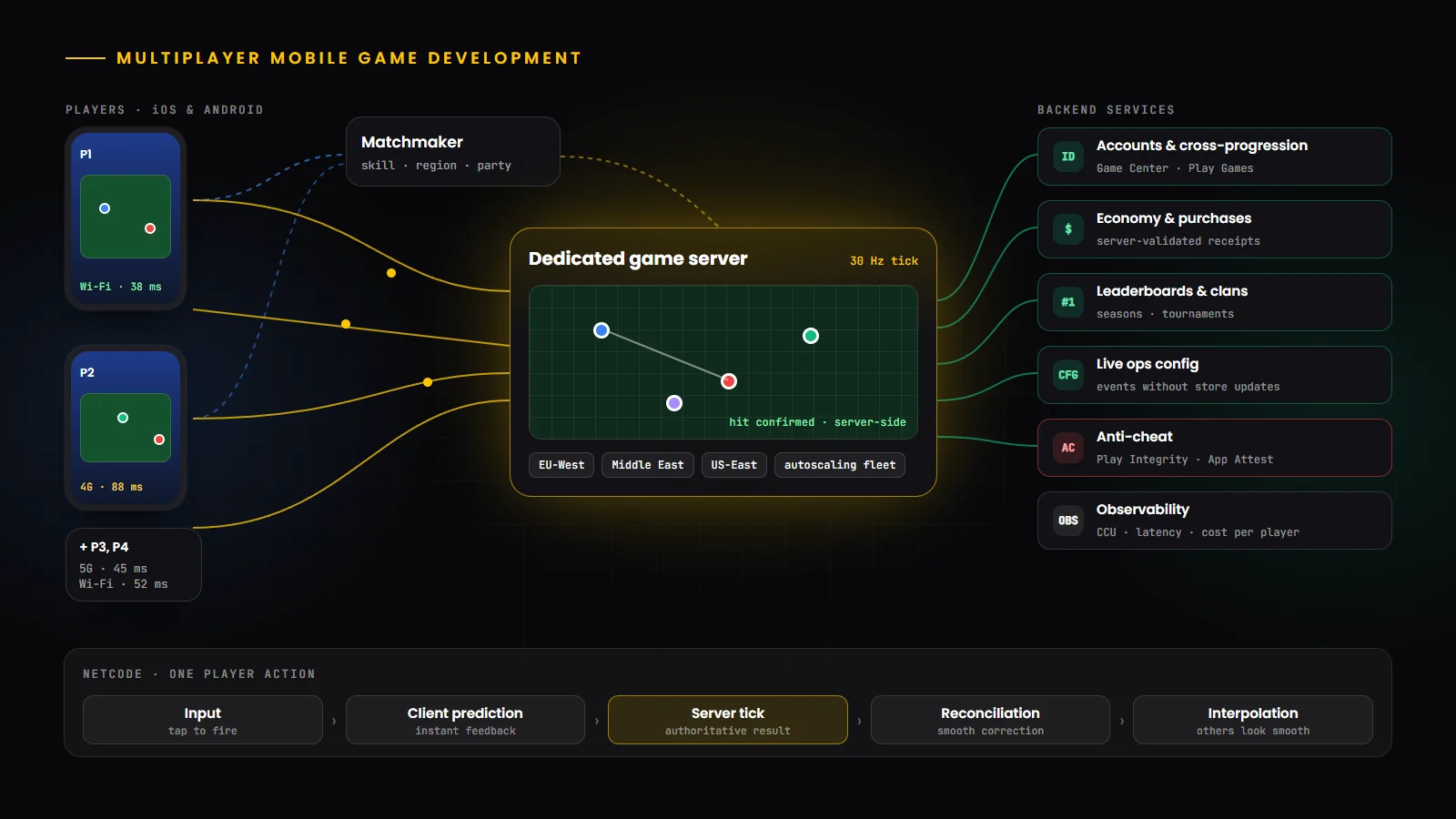
What is multiplayer mobile game development?
Multiplayer mobile game development is the work of building games where players on phones and tablets play with or against each other, either at the same moment or in turns. Beyond the game itself, it covers the networking code that keeps players in sync, the servers that host matches, the backend that stores accounts and progress, and the systems that match players, prevent cheating and scale with demand.
Multiplayer is one of the strongest drivers of engagement in mobile games, because playing with friends and rivals gives players a reason to return. It is also where many projects underestimate effort and running costs. This guide explains the architecture choices and trade-offs so you can plan a multiplayer game that is fun, fair and affordable to operate. For the wider development process, see our guide to mobile game development in 2026.
Types of multiplayer mobile games
The first decision is how players interact, because it determines almost everything else, from network architecture to hosting costs.
Type | Typical genres | Latency tolerance | Common architecture |
|---|---|---|---|
| Asynchronous and turn-based | Word, board, card and strategy games | Seconds are fine | Standard web backend and push notifications |
| Social and live events | Guilds, co-op events, leaderboards | Seconds | Backend services with real-time updates |
| Real-time casual and co-op | Party games, co-op puzzles, racing | Moderate | Relay or host-based sessions |
| Competitive real-time | Shooters, MOBA, battle royale, fighting | Very low | Dedicated authoritative servers |
Why multiplayer is harder on mobile
Mobile networks are unpredictable. Latency and jitter on cellular connections vary much more than on wired broadband, and packet loss is common in crowded places.
Connections change. Players move between Wi-Fi and cellular, lose signal in lifts and trains, and the game must reconnect gracefully instead of dropping them from the match.
Apps get interrupted. Calls, notifications and app switching send the game to the background, where iOS and Android limit network activity, so sessions need pause, timeout and rejoin rules.
Devices vary widely. Simulation and rendering must stay smooth on low and mid-range phones, not only on the latest flagships.
Battery and data matter. Chatty network code drains batteries and data plans, so updates should be compact and sent only as often as needed.
Network architecture options
There are four main ways to connect players. Each balances cost, fairness and complexity differently.
Model | How it works | Strengths | Trade-offs |
|---|---|---|---|
| Peer-to-peer | Players’ devices connect directly to each other | No game servers to pay for | NAT issues, easy to cheat, exposes player IP addresses |
| Relay or host-based | One player hosts; traffic passes through a relay service | Low cost, works through NAT | Host advantage and host-migration complexity |
| Dedicated authoritative server | A server runs the simulation; clients send inputs | Fair, cheat-resistant, consistent | Server hosting cost and operations |
| Deterministic lockstep or rollback | Every client runs the same simulation from shared inputs | Very little bandwidth, precise sync | Requires a fully deterministic simulation |
Choosing the right model
For turn-based and asynchronous games, a well-designed web backend is enough and far cheaper than game servers. For casual real-time co-op, relay-based sessions are often the best value. For competitive games where fairness matters, or where there is anything valuable to win, dedicated authoritative servers are the standard, because the server, not the player’s device, decides what happened.
Netcode fundamentals
Netcode is the set of techniques that make a game feel responsive even though data takes time to travel between devices.
Tick rate: the server updates the simulation at a fixed rate, such as 20, 30 or 60 times per second. Higher rates feel more precise but cost more CPU and bandwidth.
Client-side prediction: the player’s device applies their own inputs immediately instead of waiting for the server, so controls feel instant.
Server reconciliation: when the server’s authoritative result arrives, the client corrects any difference, ideally so smoothly that the player never notices.
Interpolation: other players are displayed slightly in the past and smoothed between updates, so movement looks fluid despite network jitter.
Lag compensation: for shooting and hit detection, the server rewinds to what the shooter saw, so players with higher latency are treated fairly.
Rollback: fighting and some action games predict opponents’ inputs and re-simulate a few frames when the real inputs arrive.
Transport and protocols
Real-time games usually send data over UDP, with their own lightweight reliability layer for messages that must arrive, because waiting for TCP to resend a lost packet causes visible stutters. Engines and networking libraries handle this for you. Turn-based and social features can use HTTPS and WebSockets, which pass easily through firewalls and work in web builds. Whatever the transport, encrypt traffic and authenticate every connection, and keep messages compact to save battery and data.
Game servers and hosting
Dedicated servers run a headless build of your game in data centres close to your players. A fleet manager starts and stops server instances as demand changes, places matches in the right region and replaces unhealthy servers. Regions matter: players in Pakistan, Europe and North America each need nearby servers for low latency, which multiplies operating complexity.
Hosting options include Amazon GameLift Servers, which AWS renamed from Amazon GameLift when it launched GameLift Streams in 2025; Agones, an open-source project for running game servers on Kubernetes; and specialist providers. The market has also changed: Unity ended its direct Multiplay game server hosting on March 31, 2026 and licensed the technology to Rocket Science Group, so teams that used it have moved to other providers. Choose hosting that you could migrate away from, and keep your server build independent of any one provider’s SDK where you can.
Teams running game backends on Kubernetes can reuse many of the practices in our guide to cloud-native application development.
Multiplayer frameworks and backend services
Most teams combine an engine networking layer with managed or open-source backend services rather than building everything from scratch. Common options in 2026 include:
Tool or service | Typically used for |
|---|---|
| Unity Netcode for GameObjects and Entities | Unity’s networking layers, including a distributed authority mode for smaller sessions, with Unity’s Relay, Lobby and Matchmaker services |
| Unreal Engine replication | Unreal’s built-in, server-authoritative replication and dedicated server builds |
| Photon Fusion and Quantum | Hosted real-time networking for Unity and other engines; Quantum is a deterministic engine with prediction and rollback |
| Nakama by Heroic Labs | Open-source game server for accounts, matchmaking, chat, leaderboards and authoritative logic |
| Microsoft PlayFab | Managed player accounts, economy, live operations and analytics |
| Epic Online Services | Free cross-platform accounts, friends, lobbies, voice and achievements |
| Amazon GameLift Servers and Agones | Hosting and scaling dedicated game server fleets |
Matchmaking, lobbies and parties
Good matchmaking balances three things: fair matches, short queue times and low latency. Skill ratings such as Elo, Glicko or TrueSkill-style systems estimate player ability; region and ping filters keep latency low; and rules relax gradually as players wait longer, so queues never feel endless. Lobbies and parties let friends play together, and backfill replaces players who leave mid-match.
Tune matchmaking with real data after launch. Small player bases need wider rules than large ones, and a soft launch is the right moment to test them.
Player accounts, cross-play and cross-progression
Players expect to keep their progress when they change phones or switch between iOS and Android. Use platform sign-in through Game Center and Google Play Games Services, offer account linking with email or other providers, and store progress on the server rather than only on the device.
Cross-play between iOS and Android is straightforward when the backend is shared. Cross-play with PC or consoles adds input fairness questions, such as touch versus mouse, and platform-specific requirements, so plan it from the start rather than adding it later.
The game backend
Beyond matches, multiplayer games need a backend for player profiles, inventories and virtual currencies, purchase validation, leaderboards and tournaments, friends and clans, cloud saves, live event schedules and remote configuration. These services are usually stateless APIs and databases, built with the same engineering practices as any scalable web backend. Validate every change to the economy on the server, keep an audit trail for purchases and rewards, and design for live operations so events and balance changes do not require a store update.
Anti-cheat and security
Never trust the client: the server should decide outcomes such as hits, scores, rewards and purchases, and validate every input for plausibility, such as impossible speeds or rates of fire.
Check device and app integrity: Google’s Play Integrity API and Apple’s App Attest help servers detect modified apps and untrusted devices.
Protect the network: encrypt traffic, authenticate sessions with short-lived tokens, rate-limit APIs and avoid exposing players’ IP addresses, which peer-to-peer designs can leak.
Plan for DDoS and abuse: managed relays and hosting providers absorb many attacks, and reporting tools, moderation and ban systems handle abusive players.
Protect players: chat filters, block and report features, and age-appropriate settings are essential, especially for games that may attract younger audiences.
Scaling and reliability
Multiplayer traffic is spiky: launches, events and featuring by the stores can multiply players overnight. Design backend services to scale horizontally, autoscale game server fleets ahead of demand, and use queues to smooth bursts. Deploy across regions where your players are, and make reconnection a first-class feature so short outages or network changes do not cost players their match.
Observability is essential. Track concurrent players, matchmaking times, server tick health, latency by region, error rates and cost per player, and alert on problems players would notice.
Testing multiplayer games
Multiplayer bugs often appear only under real network conditions and load. Use network condition simulators to test latency, jitter and packet loss; run bot clients to load-test servers and matchmaking; test reconnection, backgrounding and Wi-Fi to cellular switching on real devices; and run long soak tests to find memory leaks and desyncs. A closed beta or soft launch in a few regions is the best final test before a global release.
Multiplayer game development costs
Multiplayer adds both build costs and running costs. The factors below have the biggest effect on each.
Cost factor | Lower cost | Higher cost |
|---|---|---|
| Interaction type | Turn-based or asynchronous | Competitive real-time with fast action |
| Architecture | Relay or managed backend services | Dedicated servers across many regions |
| Concurrent players | Small sessions and modest concurrency | Large matches and high peak concurrency |
| Backend features | Accounts, saves and leaderboards | Economy, clans, chat, tournaments and live ops tools |
| Security | Basic server validation | Full anti-cheat, moderation and fraud tooling |
| Platforms | iOS and Android only | Cross-play with PC and consoles |
Planning running costs
Server, bandwidth and backend costs grow with players, so model them early. Estimate cost per concurrent player and per daily active user, reduce bandwidth with compact updates and sensible tick rates, scale fleets down at quiet times, and choose relay or asynchronous designs where real-time servers are not essential. A prototype with bots gives realistic numbers before you commit.
Multiplayer game development process
1. Define the multiplayer experience: interaction type, session size, competitive stakes and target regions.
2. Choose the architecture and engine: network model, engine networking layer, backend services and hosting. Our comparison of Unity vs Unreal Engine covers the engine side.
3. Build a networked prototype: test the core loop under simulated latency before investing in content.
4. Build the backend: accounts, matchmaking, progression, economy and analytics.
5. Harden: anti-cheat, security reviews, load tests, reconnection and failure handling.
6. Soft launch: release in selected regions, tune matchmaking, servers and costs with real players.
7. Launch and operate: scale fleets, monitor service levels and run live events and updates.
Common mistakes to avoid
Adding multiplayer late: retrofitting networking into a single-player codebase is far harder than designing for it from the start.
Trusting the client: client-authoritative designs invite cheating as soon as anything valuable is at stake.
Ignoring mobile network conditions: a game that works on office Wi-Fi may be unplayable on a train.
Underestimating running costs: real-time servers cost money every hour players are online.
Launching globally without load testing: the first big day is the worst time to discover scaling limits.
Locking into one provider: keep your server build and data portable where you can, because services change.
Choosing a multiplayer game development partner
Look for a team that has shipped multiplayer games, can explain netcode and server trade-offs in plain language, and covers both the client and the backend. Ask how they test under poor network conditions, how they prevent cheating, how they estimate and control server costs, and how they will support live operations after launch. A partner that builds in both Unity and Unreal can recommend the engine and networking stack that fit your game rather than the one they always use.
Conclusion
Multiplayer can turn a good mobile game into one players return to for years, but it raises the stakes on architecture, fairness and operating costs. Choose the interaction model first, match the network architecture to it, keep the server in charge of outcomes, design for mobile networks and interruptions, and test with real conditions and bots before launch.
Build Your Multiplayer Mobile Game With HBOX Digital
From netcode and dedicated servers to matchmaking, backends and live operations, our team builds multiplayer games for iOS and Android. Explore our mobile game development services, or work with our Unity and Unreal Engine game developers.