What is cloud-native application development?
Cloud-native application development is an approach to building software that is designed from the start to run in the cloud and take advantage of it: scaling automatically, recovering from failures on its own, deploying many times a day and paying only for the resources it uses. It is less about where an application runs and more about how it is built and operated.
The Cloud Native Computing Foundation’s definition puts it this way: cloud native technologies empower organizations to build and run scalable applications in modern, dynamic environments such as public, private and hybrid clouds, and containers, service meshes, microservices, immutable infrastructure and declarative APIs exemplify the approach. In practice, a cloud-native application is packaged in containers or functions, described as code, deployed through automated pipelines and observed through metrics, logs and traces.
This guide explains the architecture, the main technologies and the trade-offs, so you can decide how much of the cloud-native toolkit your product actually needs.
Traditional vs cloud-native applications
The table below contrasts a traditionally built application, often hosted on long-lived servers, with a cloud-native one.
Aspect | Traditional application | Cloud-native application |
|---|---|---|
| Infrastructure | Long-lived servers configured by hand | Immutable containers or functions defined as code |
| Scaling | Add bigger servers; plan capacity months ahead | Scale out automatically based on demand |
| Releases | Infrequent, large, risky deployments | Small, frequent, automated deployments with quick rollback |
| Resilience | Failures often need manual recovery | Self-healing workloads spread across availability zones |
| Architecture | Usually one large deployable unit | Modular services, APIs and managed cloud services |
| Operations | Server monitoring and log files | Observability with metrics, logs and distributed traces |
| Cost model | Pay for peak capacity all the time | Pay for what you use, if right-sized and governed |
Why businesses are adopting cloud-native architecture
Faster delivery: automated pipelines and independently deployable components let teams ship improvements in hours instead of months.
Elastic scale: applications handle traffic spikes, such as a product launch or seasonal peak, without permanent over-provisioning.
Higher availability: running across multiple availability zones with health checks and automatic restarts reduces downtime.
Better use of managed services: databases, queues, identity and AI services can be consumed as managed building blocks rather than operated in-house.
Portability: containers and Kubernetes run on every major cloud and on premises, which reduces lock-in at the application layer.
These benefits are real, but they are not automatic. Cloud-native systems are more distributed, so they need stronger engineering discipline in automation, security and cost management.
Cloud-native development trends in 2026
Kubernetes is the default platform. In the CNCF’s annual survey, published in January 2026, 82% of container users reported running Kubernetes in production, up from 66% in 2023, and 66% of organizations running generative AI models said they use Kubernetes for inference workloads.
AI workloads are reshaping platforms. GPU scheduling, model serving and long-running AI tasks are now normal requirements for cloud platforms, and serverless platforms are adapting too: at re:Invent 2025, AWS introduced Lambda durable functions for multi-step workflows that can pause and resume, and Lambda Managed Instances for running Lambda functions on chosen EC2 instance types.
Ingress is moving to the Gateway API. The Kubernetes project announced the retirement of Ingress NGINX, with maintenance halted in March 2026 and no further releases or security fixes, and recommended migrating to the Gateway API or another ingress controller.
Platform engineering is mainstream. Organizations are building internal developer platforms with paved paths for deployment, observability and security, so product teams do not need to master every cloud-native tool.
Cost discipline is back in focus. Flexera’s 2026 State of the Cloud report found that respondents estimate 29% of their cloud spend is wasted, the first increase in five years, with AI workloads adding new cost complexity.
Microservices vs monolithic architecture
Cloud native does not require microservices. A monolith is one deployable application; microservices split the system into small services that are deployed and scaled independently and communicate over the network. Each has a place.
Aspect | Monolith or modular monolith | Microservices |
|---|---|---|
| Best for | New products, small to mid-size teams, evolving domains | Large systems with several teams and clear domain boundaries |
| Deployment | One unit; simple pipeline | Many units; needs mature CI/CD and versioning |
| Scaling | Scale the whole application | Scale hot services independently |
| Data | One database, simple transactions | Database per service; eventual consistency to manage |
| Operational overhead | Low | High: networking, tracing, service discovery, failure handling |
| Main risk | Becoming tangled as it grows | A distributed monolith with all the costs and few of the benefits |
Choosing the right starting point
For most new products, a well-structured modular monolith, containerized and deployed through a proper pipeline, is the fastest and cheapest cloud-native starting point. Martin Fowler’s MonolithFirst argument still holds: extract services when a domain boundary is clear and there is a concrete reason, such as independent scaling, a separate team or a different release cadence.
Docker and containerization
A container packages an application with its runtime, libraries and configuration into an image that runs the same way on a laptop, in CI and in production. Docker popularized the workflow, and images follow the Open Container Initiative (OCI) standard, so they run on any compliant runtime, including the containerd runtime used by most Kubernetes clusters.
Good container practice includes small, minimal base images, multi-stage builds that keep compilers out of production images, running as a non-root user, pinning versions, scanning images for vulnerabilities and signing them. Configuration and secrets are injected at runtime, never baked into the image.
Kubernetes and container orchestration
Kubernetes runs containers across a cluster of machines and keeps them in the state you declare: how many replicas, how much CPU and memory, which configuration and how they are exposed. If a container crashes or a node fails, Kubernetes replaces it. It also handles rolling deployments, service discovery, autoscaling and configuration management.
Most teams use a managed service such as Amazon EKS, Google Kubernetes Engine or Azure Kubernetes Service, which run the control plane for you. Even so, Kubernetes has a learning curve and an operational cost. For smaller applications, simpler container platforms such as Amazon ECS with Fargate, Google Cloud Run or Azure Container Apps often deliver most of the benefits with less to manage.
AWS cloud application architecture
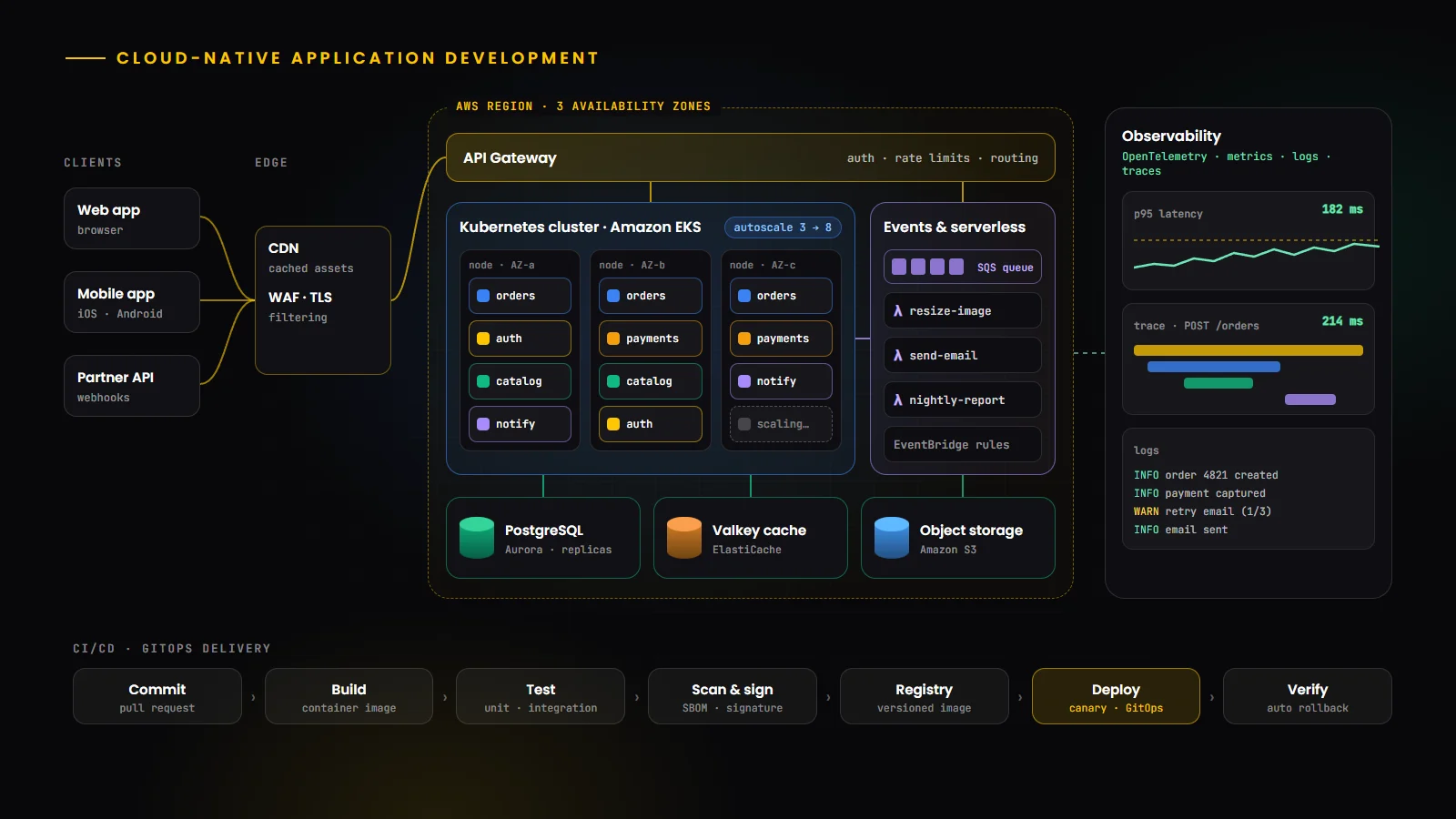
AWS offers managed building blocks for every layer of a cloud-native application. A typical architecture combines the services below, and equivalent services exist on Google Cloud and Azure; our Google Cloud team works with those as well.
Layer | Common AWS services | Role in the application |
|---|---|---|
| Edge and API | Amazon CloudFront, Amazon API Gateway, Application Load Balancer | Caching, routing, TLS and request throttling |
| Compute | Amazon EKS, Amazon ECS with AWS Fargate, AWS Lambda | Running containers and functions |
| Data | Amazon Aurora and RDS for PostgreSQL, Amazon DynamoDB, Amazon S3 | Relational, key-value and object storage |
| Caching | Amazon ElastiCache (Valkey or Redis OSS) | Sessions, hot data and rate limiting |
| Messaging | Amazon SQS, Amazon SNS, Amazon EventBridge | Asynchronous, event-driven communication |
| Security | AWS IAM, AWS Secrets Manager, AWS KMS, AWS WAF | Identity, secrets, encryption and edge protection |
| Operations | Amazon CloudWatch, AWS X-Ray or OpenTelemetry, AWS CloudFormation or CDK | Monitoring, tracing and infrastructure as code |
Designing with the Well-Architected Framework
The AWS Well-Architected Framework organizes design decisions into six pillars: operational excellence, security, reliability, performance efficiency, cost optimization and sustainability. Reviewing an architecture against these pillars early is one of the cheapest ways to avoid expensive mistakes later, whichever cloud you use.
Serverless application development
Serverless means the cloud provider runs and scales the infrastructure and you pay per request or per unit of work. AWS Lambda, Google Cloud Run functions and Azure Functions run code in response to events such as HTTP requests, queue messages or file uploads, and managed services such as API Gateway, DynamoDB and EventBridge complete the picture.
Serverless is excellent for event-driven workloads, spiky or unpredictable traffic, background processing and teams that want minimal operations. It is less suitable for steady high-throughput workloads where always-on containers can be cheaper, or for tasks with strict latency requirements that cold starts could affect. Many cloud-native systems mix both: containers for core APIs and functions for events and glue code.
API gateways and service communication
An API gateway is the front door to your services. It handles authentication, rate limiting, request routing, TLS and usage analytics, so individual services do not have to. Inside the system, services communicate synchronously through REST or gRPC when they need an immediate answer, and asynchronously through queues and event buses when they do not.
Asynchronous messaging is what makes cloud-native systems resilient: if a downstream service is slow or unavailable, messages wait in a queue instead of failing the user’s request. Design every call for failure with timeouts, retries with backoff, idempotent handlers and circuit breakers. A service mesh can add mutual TLS, retries and traffic shifting at the infrastructure level, but it adds complexity and is rarely needed for a first release.
PostgreSQL, Redis and cloud databases
PostgreSQL remains the default relational database for cloud-native applications, available as a managed service on every major cloud. PostgreSQL 18, released in September 2025, introduced an asynchronous I/O subsystem aimed at improving read performance. Use managed backups, point-in-time recovery, read replicas for read-heavy workloads and connection pooling, which matters with many containers or functions opening connections.
Redis is the common choice for caching, sessions, queues and rate limiting. Its licensing changed in 2024, which led the community to create Valkey, an open-source fork under the Linux Foundation; Redis 8 later added the AGPLv3 as a licensing option. Managed services such as Amazon ElastiCache support Valkey, so most teams can use either without operating it themselves.
Choose the database for the access pattern: relational for transactional business data, key-value or document stores for very high-scale simple lookups, object storage for files, and search or vector indexes where the application needs them.
CI/CD pipelines and DevOps automation
Continuous integration and continuous delivery are the engine of cloud-native development. Every change is built, tested, scanned and packaged automatically, then deployed through staging to production with automated checks and the ability to roll back quickly. Our DevOps services team sets up these pipelines and the platforms behind them.
1. Commit: code and infrastructure changes go through pull requests and review.
2. Build and test: unit, integration and contract tests run on every change.
3. Secure: dependency, container and infrastructure-as-code scans run, and images are signed.
4. Release: images are pushed to a registry and versioned.
5. Deploy: GitOps tools such as Argo CD or Flux sync the desired state from Git to the cluster, or pipeline tools deploy to managed services, using rolling, blue-green or canary strategies.
6. Verify: automated health checks and key metrics decide whether to continue or roll back.
Infrastructure as code with Terraform, OpenTofu, AWS CloudFormation or the AWS CDK makes environments reproducible and reviewable, and removes configuration drift.
Platform engineering and developer experience
As the number of services, environments and tools grows, asking every product team to master Kubernetes, networking, security policies and observability does not scale. Platform engineering addresses this with an internal developer platform: a curated set of templates, pipelines and self-service tools that give teams a paved path to production.
Developer portals such as Backstage, a CNCF project created at Spotify, provide a service catalogue, templates for new services and a single place for documentation and ownership. The goal is measured by developer outcomes: how quickly a new service reaches production safely, and how much time teams spend on product work rather than infrastructure.
Cloud security and access management
Identity and least privilege: give every workload its own identity, such as IAM roles for service accounts on EKS, with the minimum permissions it needs. Avoid long-lived access keys.
Secrets management: store credentials in a secrets manager, rotate them and inject them at runtime.
Network controls: keep databases and internal services in private subnets, use network policies in Kubernetes and expose only what must be public, behind a web application firewall.
Workload hardening: apply Kubernetes Pod Security Standards, run containers as non-root with read-only file systems where possible, and keep base images patched.
Supply chain: generate software bills of materials (SBOMs), sign and verify images with tools such as Sigstore, and follow the SLSA framework to harden the build pipeline.
Detection and audit: enable audit logs across cloud accounts and clusters, alert on suspicious activity and test incident response.
Application monitoring and observability
In a distributed system, you cannot debug by logging into a server. Observability means collecting enough telemetry to understand any behaviour from the outside: metrics for trends and alerts, structured logs for detail, and distributed traces that follow a request across services.
OpenTelemetry, a CNCF project, provides vendor-neutral APIs, SDKs and a collector for traces, metrics and logs, so you can instrument once and send data to Prometheus, Grafana, a cloud provider’s tools or a commercial platform. Define service level objectives for the user journeys that matter, alert on symptoms users would notice rather than on every CPU spike, and review incidents without blame to improve the system.
Performance, scalability and availability
Scale out, not up: design stateless services that can run as many replicas as needed, with state in managed databases, caches and object storage.
Autoscale on the right signal: CPU is a start, but queue depth, request rate or latency often reflect real demand better. Kubernetes autoscalers and serverless platforms can scale on these signals.
Cache aggressively: use a CDN for static assets and cacheable API responses, and an in-memory cache for hot data.
Spread for resilience: run across multiple availability zones, use health checks and readiness probes, and design graceful degradation so one failing feature does not take down the whole application.
Test it: load-test before major launches and practise failure scenarios, such as losing a zone or a dependency, so recovery is proven rather than assumed.
Cloud migration and application modernization
Few organizations start from scratch. Modernization usually follows one of several strategies, often summarized as the 7 Rs: retire, retain, rehost, relocate, repurchase, replatform and refactor. Rehosting moves an application as it is; replatforming makes targeted changes such as moving to a managed database or containers; refactoring re-architects parts of the system to be cloud native.
The lowest-risk path for a large legacy system is incremental: containerize and automate deployment first, move data to managed services, then extract high-value capabilities behind APIs using the strangler fig pattern, where new services gradually take over functionality from the old system. Each step should deliver value on its own. Our cloud migration services follow this assessment-first, wave-based approach.
Cloud-native development process
1. Assess and plan: define business goals, non-functional requirements such as availability and data residency, and the current state of any existing systems.
2. Design the architecture: choose service boundaries, data stores, communication patterns and the compute platform, and review the design against the Well-Architected pillars.
3. Build the foundation: set up cloud accounts, networking, identity, infrastructure as code, CI/CD and observability before the first feature ships.
4. Develop iteratively: build features in small increments with automated tests and frequent deployments to staging and production.
5. Harden: run security reviews, load tests and failure tests; set up alerts and runbooks.
6. Launch and operate: release gradually, monitor service level objectives, and review cost and performance regularly.
Cloud-native back ends are frequently built with Node.js, Python, Go, Java or .NET. Our Node.js developers and full stack developers work across the APIs, front ends and infrastructure code that these systems need.
Cloud development cost considerations
Cloud-native applications can be very cost-efficient, but costs follow architecture decisions. The factors below have the biggest effect on both build and running costs.
Cost factor | Lower cost | Higher cost |
|---|---|---|
| Architecture | Modular monolith on managed containers or serverless | Many microservices with a service mesh and multiple clusters |
| Compute model | Right-sized, autoscaled, with commitment discounts for steady load | Over-provisioned, always-on capacity |
| Data | Managed database sized to the workload, sensible retention | Large multi-region databases and unmanaged data growth |
| Data transfer | Traffic kept within zones and regions, CDN for static content | Heavy cross-region or internet egress |
| Observability | Sampled traces and log levels tuned to need | Unfiltered high-volume logs and metrics |
| Requirements | Standard availability and compliance needs | Multi-region active-active, strict compliance and audit |
Managing cloud costs with FinOps
FinOps is the practice of making engineering, finance and business teams jointly accountable for cloud spend. In practice that means tagging every resource with an owner, giving teams cost dashboards, setting budgets and alerts, reviewing unused resources, right-sizing regularly and using commitment discounts for predictable workloads. Building cost visibility into the platform from the start is far easier than retrofitting it.
Common implementation challenges
Over-engineering: adopting microservices, a service mesh and multiple clusters before the product needs them. Start simple and add complexity when there is a measured reason.
Skills gaps: Kubernetes, networking, security and observability each take time to master. Platform engineering and managed services reduce the load on product teams.
Distributed data: consistency across services is hard. Keep transactions within one service where possible and use events and idempotent handlers across boundaries.
Security misconfiguration: overly broad permissions and public resources remain common causes of incidents. Use policy as code and automated checks.
Cost surprises: without tagging, budgets and ownership, spend grows quietly. Make cost a first-class metric alongside performance.
Day-two operations: upgrades, certificate renewals, dependency patches and incident response continue after launch. Plan and budget for ongoing application maintenance and support.
How to choose a cloud development company
Look for a partner that designs for your scale today and your growth tomorrow, rather than for the most impressive architecture diagram. Good signs include experience on your target cloud, infrastructure as code and CI/CD as standard deliverables, a clear security approach covering identity, secrets and supply chain, observability built in from the start, honest guidance on when not to use microservices or Kubernetes, and transparent cost estimates for both build and operation.
Ask how they hand over environments and documentation, how they test resilience and how they keep running costs in check. A partner who can also build the product itself, from custom software development to complete web applications and SaaS platforms, avoids a gap between the people who write the application and the people who run it.
Conclusion
Cloud-native application development in 2026 is about building software that scales, recovers and ships continuously, using containers, managed services, automation and observability. The technologies are mature, but the best results come from matching the architecture to the product: start with a clean, containerized foundation and solid pipelines, adopt Kubernetes, serverless or microservices where they solve real problems, and treat security and cost as engineering requirements from day one.
To see how developers work across this stack, read our guides to what a full stack developer does and Next.js full stack development. If you are planning AI features on top of your platform, our guide to AI agent development in 2026 covers how agents fit into cloud-native systems.
Build Scalable Cloud Applications With HBOX Digital
Develop reliable, scalable cloud applications with modern backend architecture and cloud engineering. From architecture and containerization to CI/CD, observability and cost optimization, our cloud application development team helps you build cloud-native software that is ready to grow.